Sound Effect Generation
Leverage the power of generative AI to create custom sound effects on the fly using text prompts. This feature, powered by ElevenLabs, allows for rapid prototyping and the creation of dynamic audio environments without needing a pre-existing sound library.
Currently Supported Providers:
- ElevenLabs
1. Sound Effect Generation
This feature is ideal for situations where you need unique audio cues that can be described in words, such as “a metallic clang,” “a futuristic whoosh,” or “footsteps on wet gravel.”
Blueprint Implementation
The Blueprint workflow is straightforward: specify a text prompt and duration, and the node returns raw audio data that can be played as a sound.
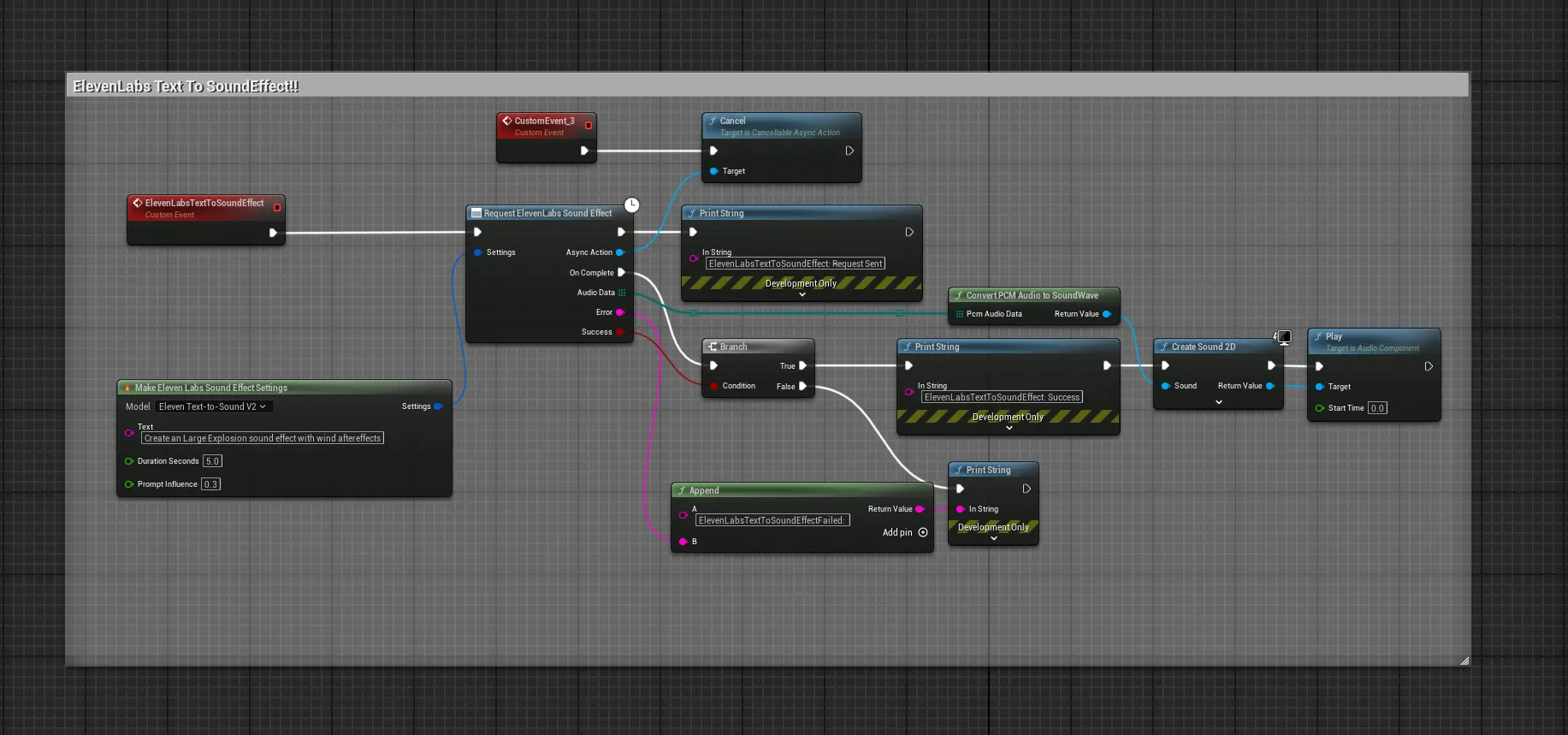
The key nodes are:
- Request ElevenLabs Sound Effect: The latent node that sends the request. Use the
Make Gen ElevenLabs Sound Effect Settingsnode to configure theTextprompt,Durationin seconds, andPrompt Influence. - Convert PCM Audio To Sound Wave: This essential helper converts the raw audio data into a playable
USoundWave. - Play Sound 2D: A standard node to play the generated sound.
C++ Implementation
#include "Models/ElevenLabs/GenElevenLabsSoundEffect.h"
#include "Data/ElevenLabs/GenElevenLabsAudioStructs.h"
#include "Utilities/GenAIAudioUtils.h"
#include "Kismet/GameplayStatics.h"

void AMyActor::GenerateSoundEffect(const FString& Prompt)
{
    // 1. Configure the sound effect request
    FElevenLabsSoundEffectSettings SESettings;
    SESettings.Text = Prompt;
    SESettings.DurationSeconds = 4.0f; // Generate a 4-second clip
    SESettings.PromptInfluence = 0.5f;

    // 2. Send the request
    UGenElevenLabsSoundEffect::SendSoundEffectRequest(SESettings,
        FOnElevenLabsSoundEffectCompletionResponse::CreateLambda([this](const TArray<uint8>& AudioData, const FString& ErrorMessage, bool bSuccess)
        {
            if (bSuccess && AudioData.Num() > 0)
            {
                // 3. Convert and play the sound
                if (USoundWave* PlayableSound = UGenAIAudioUtils::ConvertPCMAudioToSoundWave(AudioData))
                {
                    UGameplayStatics::PlaySound2D(this, PlayableSound);
                }
            }
        })
    );
}