Chat Completions
Chat completions are the core of conversational AI in the GenAI for Unreal plugin. This page covers how to send text-based and multimodal chat requests to AI models, including best practices for structuring messages and handling responses.
1. Basic Text Chat
The simplest way to interact with AI models is through text-only chat completions. This involves sending a series of messages (system prompt, user input, assistant responses) and receiving a generated response.
In Blueprints
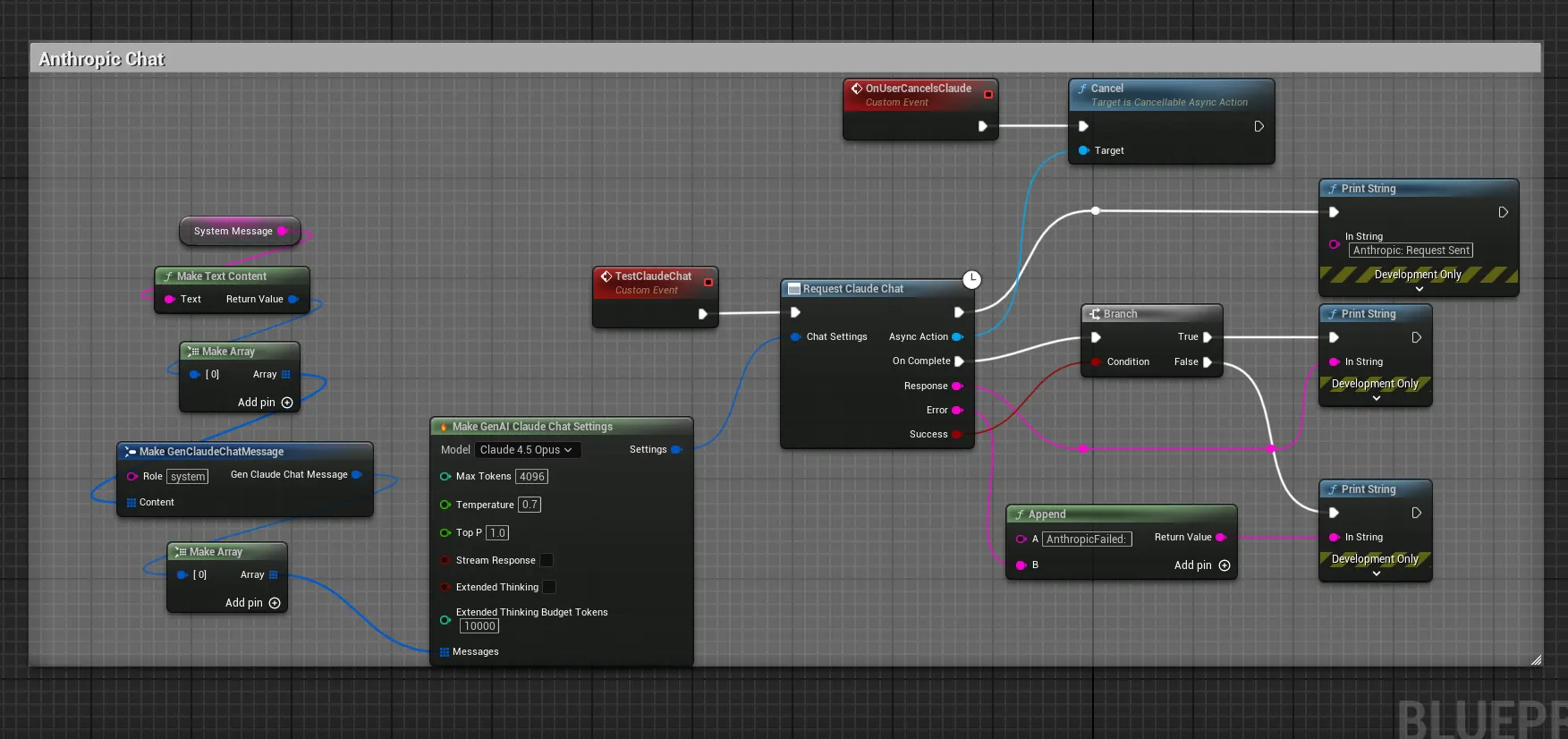
Use the “Request [Provider] Chat Completion” node, such as Request OpenAI Chat Completion. You’ll need to provide:
- Settings: A struct containing model selection, temperature, max tokens, etc.
- Messages: An array of message structs (role: system/user/assistant, content: text)
- Callback: An event to handle the response
In C++
Use the static function from the provider’s chat class:
UGenOAIChat::SendChatRequest(Settings, Messages, FOnChatCompletionResponse::CreateLambda([](/* response params */) {
    // Handle response
}));
2. Multimodal Chat (Vision)
Many modern AI models support multimodal inputs, allowing you to include images alongside text in your chat messages. This enables powerful use cases like analyzing in-game screenshots, describing scenes, or generating responses based on visual context.
Supported Providers
- OpenAI
- Anthropic
- XAI
Setting up image Content
To include images in your chat messages, You can either import texture as a file or as a raw buffer or even as a Unreal Texture (Uncompressed only)
Important: Texture Format Support
⚠️ Texture Compression Warning
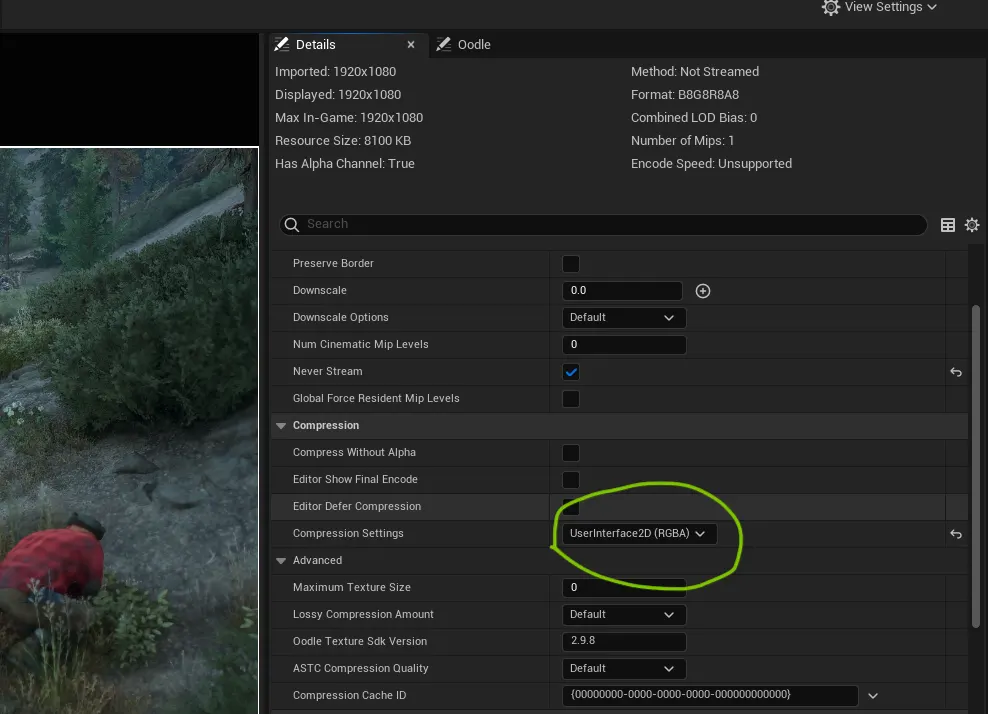
Plugin Version 1.6.0 and Below: The FromTexture2D and Make Image Content from Texture nodes only support uncompressed textures (UserInterface2D/RGBA format). Compressed textures (DXT1/DXT5) will either fail to convert or in rare cases crash the editor!
Plugin Version 1.7.0+: FromTexture2D now supports ALL texture formats including compressed ones in EDITOR, and only uncompressed one's in Game Builds. So, we recommend using UserInterface2D (RGBA) compression on textures you plan to send to AI models.
Compressed textures in packaged builds will return an error - use RGBA format for production.
Blueprint Nodes
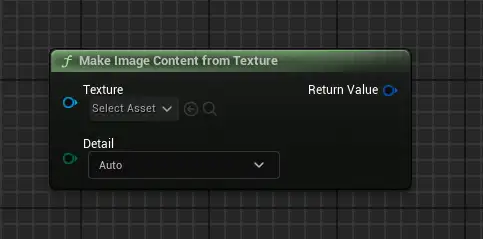
- Make Image Content from Texture: Converts a UTexture2D to image content for chat messages
- From Texture 2D: Alternative node for texture conversion
Message Structure
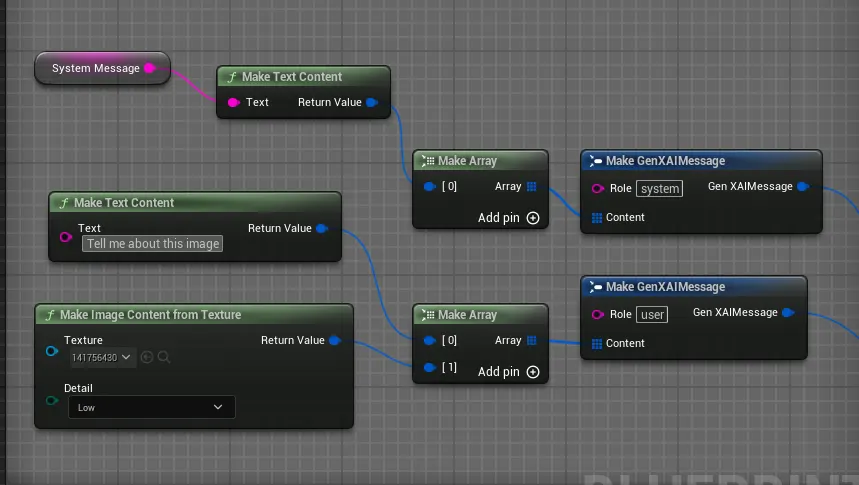
When creating multimodal messages, use the “Make [Provider] Message” node with content that includes both text and image parts:
// Pseudo-code
Make OpenAI Message:
    Role: User
    Content: Array of content parts
        - Text: "What's in this image?"
        - Image: (from Make Image Content from Texture)
3. OpenAI Responses API (Beta)
The OpenAI Responses API is a newer API designed for models that are Responses API-only, such as gpt-5.4, gpt-5.4-pro, gpt-5.2-pro, gpt-5.3-codex, and other Codex models. These models do not support the standard Chat Completions endpoint and must use the Responses API instead.
The plugin provides a dedicated class, UGenOAIResponses, that handles the Responses API with the same familiar async pattern.
When to Use
- Use
UGenOAIChat(Chat Completions) for standard models likegpt-5-mini,gpt-5.1,gpt-4o, etc. - Use
UGenOAIResponses(Responses API) for Pro and Codex models likegpt-5.4-pro,gpt-5.3-codex,gpt-5.2-pro, etc or for advanced features like web search or inchat image generation etc.
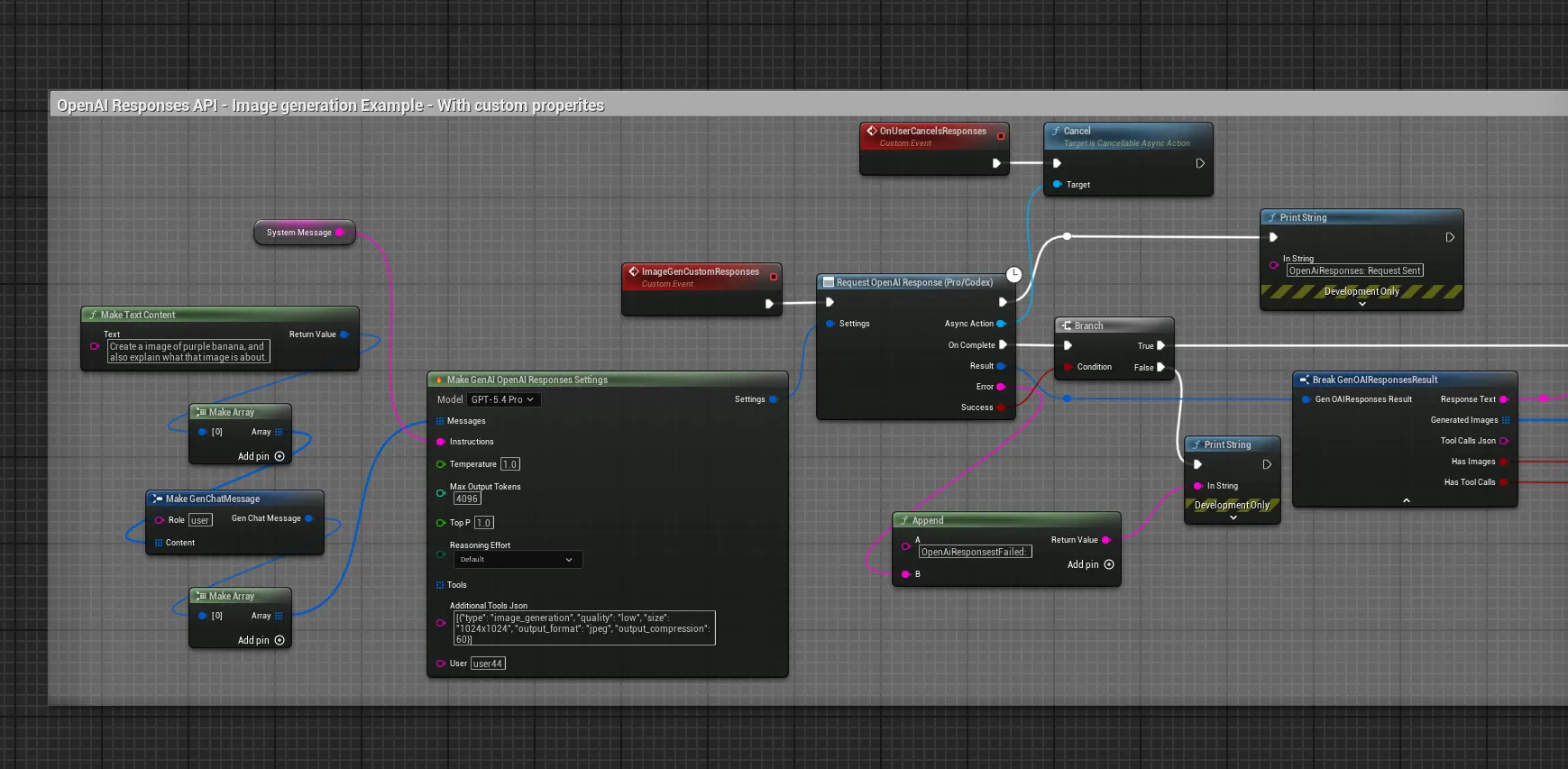
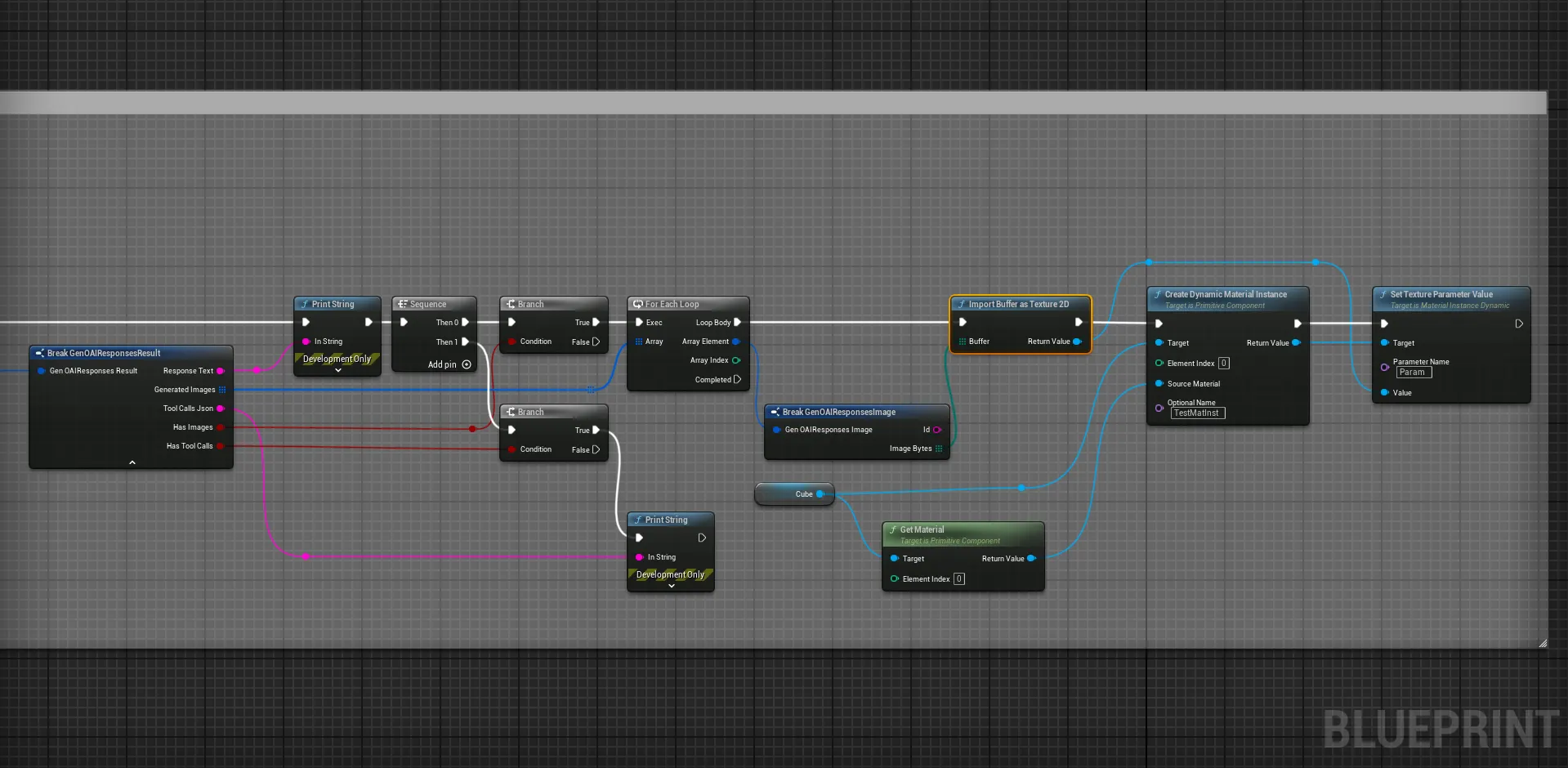
Key Settings (FGenOpenAIResponsesSettings)
| Property | Type | Description |
|---|---|---|
Model |
FString |
The model to use (defaults to gpt-5.4-pro). |
Messages |
TArray<FGenChatMessage> |
Conversation history, same format as Chat Completions. |
Instructions |
FString |
System-level instructions (equivalent to a system message). |
Temperature |
float |
Controls randomness (0.0 to 2.0). |
MaxOutputTokens |
int32 |
Maximum tokens to generate (default: 4096). |
ReasoningEffort |
EGenAIResponsesReasoningEffort |
Controls reasoning depth: Low, Medium, High, or Default. |
Tools |
TArray<FGenAIToolDefinition> |
Optional function/tool definitions the model can call. |
AdditionalToolsJson |
FString |
Raw JSON for built-in tools like web_search or image_generation. |
Built-in Tools (AdditionalToolsJson)
The Responses API supports OpenAI’s built-in tools alongside custom function tools. To enable them, pass a JSON array string to the AdditionalToolsJson field. These are appended to any function tools you define in the Tools array.
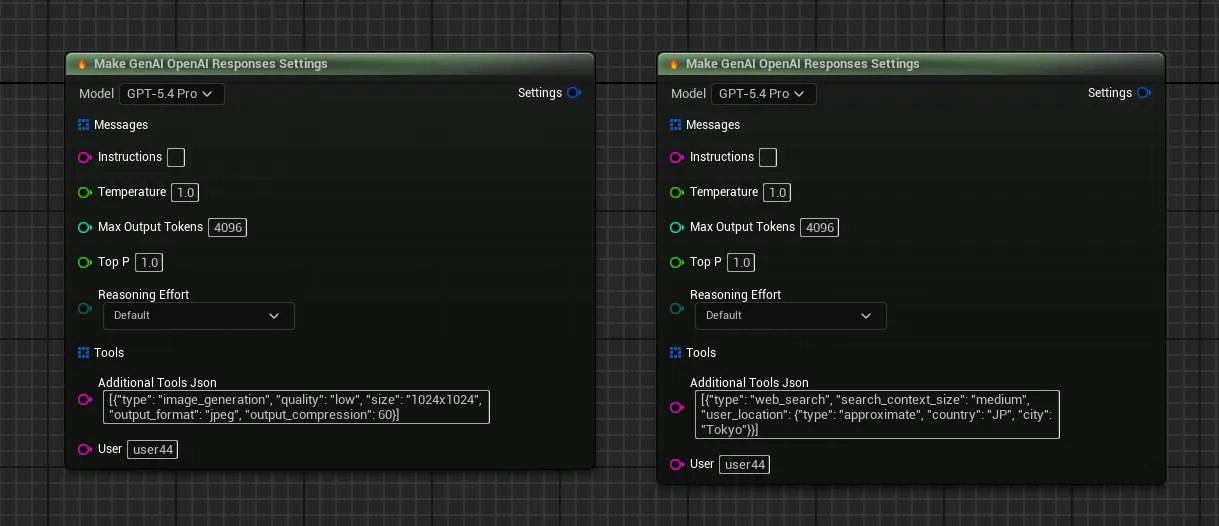
In Blueprints, the Additional Tools Json field on the Make Gen OpenAI Responses Settings node accepts the same JSON strings shown below.
Image Generation Tool
Allows the model to generate images inline during a conversation. See the Image Generation page for full details and C++ examples.
| Parameter | Values | Default |
|---|---|---|
quality |
low, medium, high, auto |
auto |
size |
1024x1024, 1024x1536, 1536x1024, auto |
auto |
output_format |
png, webp, jpeg |
png |
output_compression |
0 - 100 (lower = smaller file) |
100 |
background |
transparent, opaque, auto |
auto |
partial_images |
0 - 3 (progressive previews) |
0 |
Examples:
// Quick draft — low quality, small size, JPEG for speed
Settings.AdditionalToolsJson = TEXT(R"([{"type": "image_generation", "quality": "low", "size": "1024x1024", "output_format": "jpeg", "output_compression": 60}])");

// High-res portrait (e.g., character art, vertical posters)
Settings.AdditionalToolsJson = TEXT(R"([{"type": "image_generation", "quality": "high", "size": "1024x1536", "output_format": "png"}])");

// Wide landscape (e.g., environment concept art, loading screens)
Settings.AdditionalToolsJson = TEXT(R"([{"type": "image_generation", "quality": "high", "size": "1536x1024"}])");

// Transparent background (e.g., UI icons, item sprites)
Settings.AdditionalToolsJson = TEXT(R"([{"type": "image_generation", "quality": "medium", "size": "1024x1024", "background": "transparent", "output_format": "png"}])");
Web Search Tool
Allows the model to search the web for up-to-date information. Useful for grounding responses in real-world data.
| Parameter | Values | Default |
|---|---|---|
search_context_size |
low, medium, high |
medium |
user_location |
Object with type, city, country, region, timezone |
none |
search_context_size controls how much search result content is fed to the model — low is cheaper/faster, high gives the model more context to work with.
Examples:
// Basic web search — default settings
Settings.AdditionalToolsJson = TEXT(R"([{"type": "web_search"}])");

// Thorough search — more context for complex research questions
Settings.AdditionalToolsJson = TEXT(R"([{"type": "web_search", "search_context_size": "high"}])");

// Lightweight search — cheaper, faster, for simple fact lookups
Settings.AdditionalToolsJson = TEXT(R"([{"type": "web_search", "search_context_size": "low"}])");

// Location-aware search — results biased toward a specific region
Settings.AdditionalToolsJson = TEXT(R"([{"type": "web_search", "search_context_size": "medium", "user_location": {"type": "approximate", "country": "JP", "city": "Tokyo"}}])");
Code Interpreter Tool (Experimental)
Allows the model to write and execute Python code in a sandboxed environment. Requires a container configuration.
// Auto-create a container (simplest setup)
Settings.AdditionalToolsJson = TEXT(R"([{"type": "code_interpreter", "container": {"type": "auto"}}])");
File Search Tool
Allows the model to search through files you’ve uploaded to an OpenAI vector store. Requires a vector store ID.
// Search a specific vector store
Settings.AdditionalToolsJson = TEXT(R"([{"type": "file_search", "vector_store_ids": ["vs_abc123"]}])");
Combining Multiple Tools
You can enable any combination of tools in a single request:
// Web search + high-quality image generation
Settings.AdditionalToolsJson = TEXT(R"([{"type": "web_search", "search_context_size": "high"}, {"type": "image_generation", "quality": "high", "size": "1536x1024"}])");
C++ Example
#include "Models/OpenAI/GenOAIResponses.h"
#include "Data/OpenAI/GenOAIResponsesStructs.h"

void AMyActor::RequestFromResponsesAPI()
{
    FGenOpenAIResponsesSettings Settings;
    Settings.Model = TEXT("gpt-5.4-pro");
    Settings.Instructions = TEXT("You are a helpful game design assistant.");
    Settings.Temperature = 0.7f;
    Settings.ReasoningEffort = EGenAIResponsesReasoningEffort::High;

    // Optional: Enable built-in tools (web search, image generation, etc.)
    Settings.AdditionalToolsJson = TEXT("[{\"type\": \"web_search\"}]");

    FGenChatMessage UserMsg;
    UserMsg.Role = TEXT("user");
    UserMsg.TextContent = TEXT("Design a boss encounter for a dark fantasy RPG.");
    Settings.Messages.Add(UserMsg);

    UGenOAIResponses::SendResponsesRequest(Settings,
        FOnResponsesCompletionResponse::CreateLambda([](const FGenOAIResponsesResult& Result, const FString& Error, bool bSuccess)
        {
            if (bSuccess)
            {
                UE_LOG(LogTemp, Log, TEXT("Responses API result: %s"), *Result.ResponseText);
            }
            else
            {
                UE_LOG(LogTemp, Error, TEXT("Error: %s"), *Error);
            }
        })
    );
}
Blueprint Implementation
Use the “Request OpenAI Response (Pro/Codex)” node. Configure it with the Make Gen OpenAI Responses Settings node, which provides the same familiar fields (model, messages, temperature) plus Responses API-specific options like Instructions and Reasoning Effort.
4. Streaming Chat Responses
For real-time chat experiences, use the streaming versions of chat nodes. These provide incremental responses as they’re generated, allowing for typewriter effects and interruptible conversations.
See the Streaming page for detailed information on implementing streaming chat.
5. Best Practices
- Message History: Maintain conversation context by including previous messages in the array
- System Prompts: Use system messages to set the AI’s behavior and role
- Token Limits: Monitor token usage to avoid hitting API limits
- Error Handling: Always implement proper error handling for failed requests
- Texture Optimization: Use RGBA textures for multimodal chat to ensure compatibility across all build types
6. Example Use Cases
- NPC Dialogue: Generate dynamic responses based on player input
- Scene Analysis: Describe or analyze in-game screenshots
- Procedural Content: Generate descriptions for dynamically created assets
- Interactive Storytelling: Build branching narratives with AI assistance