Function Calling (Tool Use)
Function Calling (also known as Tool Use) allows AI models to request the execution of functions you define. Instead of just generating text, the model can decide to call a specific function with structured arguments, enabling AI-driven gameplay actions, data lookups, inventory management, and dynamic world interactions.
Currently Supported Providers
- OpenAI (Chat Completions API)
- Anthropic (Claude)
How It Works
The function calling flow is a multi-step conversation:
- Define Tools: You describe your available functions (name, description, parameter schema) and send them alongside your chat messages.
- Model Decides: The AI model analyzes the conversation and decides whether to respond with text or request a tool call.
- Execute Locally: If the model requests a tool call, your game code executes the corresponding function with the provided arguments.
- Return Results: You send the function’s result back to the model in a follow-up request.
- Final Response: The model incorporates the tool result into its final text response to the user.
Key Structs
The plugin provides a shared set of structs that work across both OpenAI and Anthropic:
FGenAIToolDefinition
Defines a function tool that the AI model can call.
| Property | Type | Description |
|---|---|---|
Name |
FString |
The function name (e.g., get_npc_health, open_door). Must be a valid identifier. |
Description |
FString |
A clear description of what the function does and when to call it. |
ParametersJson |
FString |
JSON Schema string defining the function’s input parameters. |
bStrict |
bool |
(OpenAI only) When true, enforces strict schema adherence for arguments. |
FGenAIToolCall
Represents a tool call made by the AI model in its response.
| Property | Type | Description |
|---|---|---|
Id |
FString |
Unique ID for this tool call. Must be included when sending results back. |
Name |
FString |
The name of the function the model wants to call. |
ArgumentsJson |
FString |
JSON string of the arguments generated by the model. |
FGenAIToolCallResult
The result of executing a tool call, sent back to the model.
| Property | Type | Description |
|---|---|---|
CallId |
FString |
The ID of the tool call this result is for. Must match FGenAIToolCall::Id. |
ResultJson |
FString |
Your function’s output as a JSON string or plain text. |
Utility Functions (UGenAIToolUtilities)
The plugin includes a Blueprint Function Library for working with tool calls without manual JSON parsing:
| Function | Description |
|---|---|
| Parse OpenAI Tool Calls | Parses tool calls from an OpenAI chat response string. Returns an empty array if no tool calls were found. |
| Parse Claude Tool Calls | Parses tool_use content blocks from a Claude response string. Returns an empty array if no tool calls were found. |
| Response Has Tool Calls | Quick check if a response contains tool calls. Works for both OpenAI and Claude. |
| Get Tool Call Argument | Extracts a single string argument from a tool call’s JSON by key name. |
| Get All Tool Call Arguments | Extracts all arguments as a key-value TMap<FString, FString>. Nested objects are returned as JSON strings. |
C++ Implementation (OpenAI)
#include "Models/OpenAI/GenOAIChat.h"
#include "Data/OpenAI/GenOAIChatStructs.h"
#include "Data/GenAIToolStructs.h"

void AMyActor::AskAIWithTools()
{
    // 1. Define a tool
    FGenAIToolDefinition WeatherTool;
    WeatherTool.Name = TEXT("get_weather");
    WeatherTool.Description = TEXT("Gets the current weather for a given location in the game world.");
    WeatherTool.ParametersJson = TEXT(R"({
        "type": "object",
        "properties": {
            "location": {
                "type": "string",
                "description": "The name of the in-game location (e.g., 'Dragon's Keep', 'Elven Forest')"
            }
        },
        "required": ["location"]
    })");

    "

    // 2. Configure chat settings with tools
    FGenOpenAIChatSettings ChatSettings;
    ChatSettings.Model = TEXT("gpt-5-mini");
    ChatSettings.Tools.Add(WeatherTool);

    // Add messages
    FGenChatMessage UserMessage;
    UserMessage.Role = TEXT("user");
    UserMessage.TextContent = TEXT("What's the weather like at Dragon's Keep?");
    ChatSettings.Messages.Add(UserMessage);

    // 3. Send the request
    UGenOAIChat::SendChatRequest(ChatSettings,
        FOnChatCompletionResponse::CreateLambda([](const FString& Response, const FString& Error, bool bSuccess)
        {
            if (!bSuccess) return;

            // 4. Check if the model wants to call a tool
            if (UGenAIToolUtilities::ResponseHasToolCalls(Response))
            {
                TArray<FGenAIToolCall> ToolCalls = UGenAIToolUtilities::ParseOpenAIToolCalls(Response);
                for (const FGenAIToolCall& Call : ToolCalls)
                {
                    if (Call.Name == TEXT("get_weather"))
                    {
                        FString Location;
                        UGenAIToolUtilities::GetToolCallArgument(Call, TEXT("location"), Location);

                        // Execute your game function
                        FString WeatherResult = GetGameWeather(Location); // Your function

                        // 5. Send the result back in a follow-up request
                        // (add the tool result to the message history and call SendChatRequest again)
                    }
                }
            }
            else
            {
                // Model responded with plain text
                UE_LOG(LogTemp, Log, TEXT("AI Response: %s"), *Response);
            }
        })
    );
}
C++ Implementation (Anthropic Claude)
#include "Models/Anthropic/GenClaudeChat.h"
#include "Data/Anthropic/GenClaudeChatStructs.h"
#include "Data/GenAIToolStructs.h"

void AMyActor::AskClaudeWithTools()
{
    // 1. Define a tool (same struct works for both providers)
    FGenAIToolDefinition HealthTool;
    HealthTool.Name = TEXT("get_npc_health");
    HealthTool.Description = TEXT("Gets the current health of an NPC by name.");
    HealthTool.ParametersJson = TEXT(R"({
        "type": "object",
        "properties": {
            "npc_name": {
                "type": "string",
                "description": "The name of the NPC"
            }
        },
        "required": ["npc_name"]
    })");

    // 2. Configure Claude chat settings with tools
    FGenClaudeChatSettings ClaudeSettings;
    ClaudeSettings.Model = TEXT("claude-sonnet-4-6");
    ClaudeSettings.Tools.Add(HealthTool);

    // Add messages
    ClaudeSettings.Messages.Add(FGenClaudeChatMessage(TEXT("user"), TEXT("How much health does the blacksmith have?")));

    // 3. Send the request and parse with ParseClaudeToolCalls
    UGenClaudeChat::SendChatRequest(ClaudeSettings,
        FOnClaudeChatCompletionResponse::CreateLambda([](const FString& Response, const FString& Error, bool bSuccess)
        {
            if (!bSuccess) return;

            if (UGenAIToolUtilities::ResponseHasToolCalls(Response))
            {
                // Use the Claude-specific parser
                TArray<FGenAIToolCall> ToolCalls = UGenAIToolUtilities::ParseClaudeToolCalls(Response);
                for (const FGenAIToolCall& Call : ToolCalls)
                {
                    FString NPCName;
                    UGenAIToolUtilities::GetToolCallArgument(Call, TEXT("npc_name"), NPCName);
                    // Execute your game function and send result back...
                }
            }
        })
    );
}
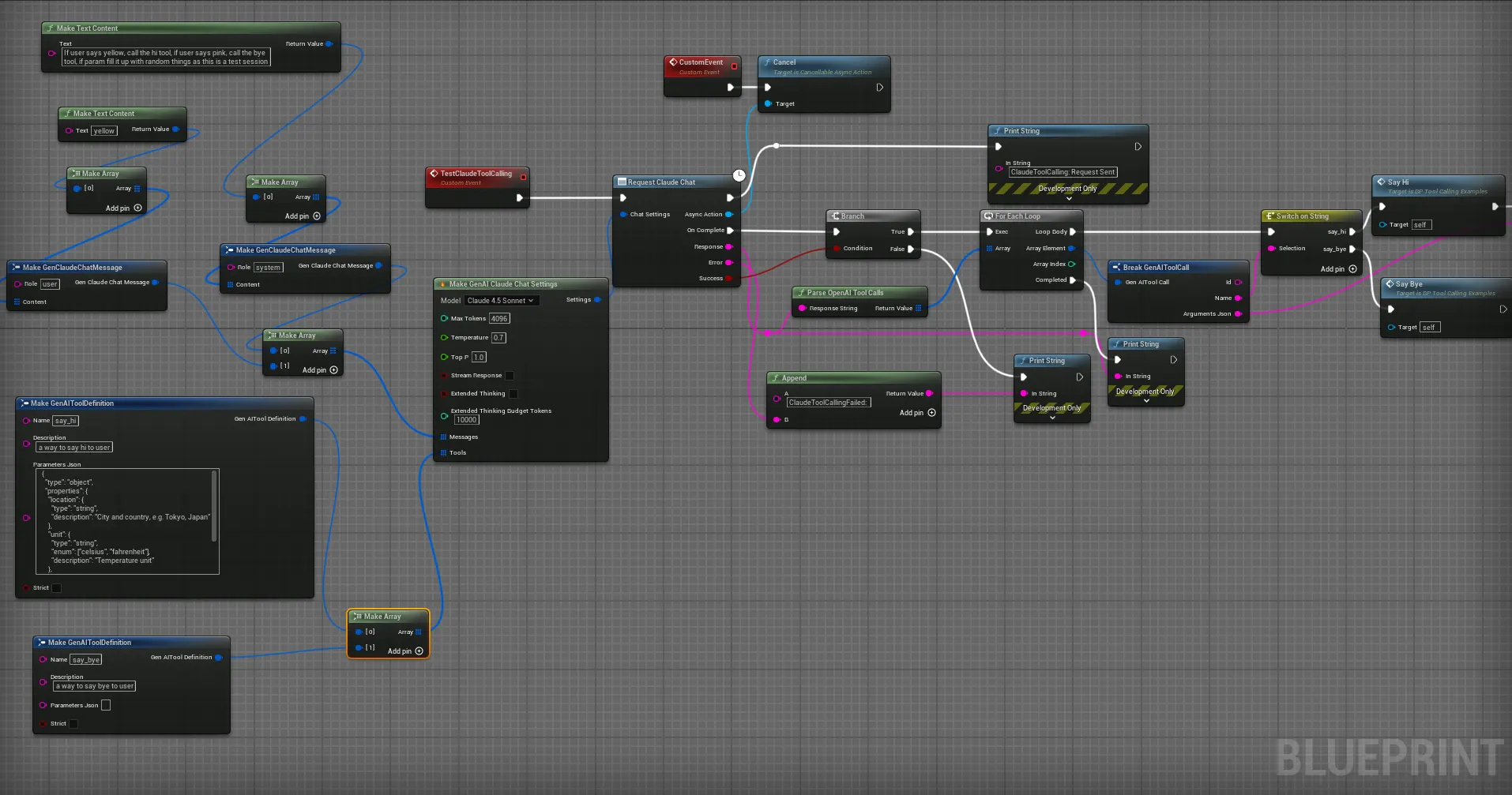
Blueprint Implementation
In Blueprints, the workflow follows the same pattern:
- Create Tool Definitions: Use the
Make GenAIToolDefinitionnode to define each function with its name, description, and JSON parameter schema. - Add to Settings: Connect the tool definitions array to the
Toolspin on yourMake Gen OpenAI Chat SettingsorMake Gen Claude Chat Settingsnode. - Send Request: Use
Request OpenAI Chat CompletionorRequest Claude Chat Completionas usual. - Check for Tool Calls: On the response, use
Response Has Tool Callsto check if the model wants to call a function. - Parse & Execute: Use
Parse OpenAI Tool CallsorParse Claude Tool Callsto get the array of tool calls. UseGet Tool Call Argumentto extract individual argument values. - Return Results: Build a follow-up message array that includes the tool result and send another request.
Best Practices
- Clear Descriptions: Write detailed, specific descriptions for each tool. The model uses these to decide when to call a function.
- Minimal Parameters: Only include parameters the model needs to provide. Don’t require data the model can’t reasonably know.
- Validate Arguments: Always validate the arguments from the model before executing game logic. The model generates JSON that may occasionally have unexpected values.
- Handle Multiple Calls: A single response can contain multiple tool calls. Always iterate over the full array.
- Conversation Flow: After returning tool results, the model will generate a natural language response incorporating the data. This creates seamless NPC interactions.
Common Use Cases
- NPC Interactions: Let NPCs check inventory, open doors, give quests, or look up game state dynamically.
- AI Game Master: An AI director that calls functions to spawn enemies, change weather, or trigger events based on player actions.
- Voice Commands: Combine with transcription to let players speak commands that trigger game functions via AI interpretation.
- Dynamic World Queries: Allow AI characters to query world state (time of day, nearby enemies, player stats) to generate context-aware dialogue.