Usage Guides & Examples
This section provides access to our comprehensive example project, which is the best resource for learning how to use the GenAI China plugin effectively.
📥 Download Example Project
A Blueprint-only project is available for each supported Unreal Engine version. Please download the one that matches your engine. All links point to Google Drive.
Important Requirements
The latest version of the plugin must be installed to your engine from the Fab store before opening these projects. Without it, the Blueprint project will have errors and fail to open.
| Engine Version | Blueprint-Only Project |
|---|---|
| Unreal Engine 5.7 | GenAIExample_UE5.7_BP_China.zip |
| Unreal Engine 5.6 | GenAIExample_UE5.6_BP_China.zip |
| Unreal Engine 5.5 | GenAIExample_UE5.5_BP_China.zip |
| Unreal Engine 5.4 | GenAIExample_UE5.4_BP_China.zip |
| Unreal Engine 5.3 | GenAIExample_UE5.3_BP_China.zip |
| Unreal Engine 5.2 | GenAIExample_UE5.2_BP_China.zip |
| Unreal Engine 5.1 | GenAIExample_UE5.1_BP_China.zip |
Blueprint Usage Walkthrough
All asynchronous Blueprint nodes share a similar structure. Use the “Make…” node to configure the settings for a request. For model selection, these nodes provide a convenient dropdown list of all supported models for that provider and service.
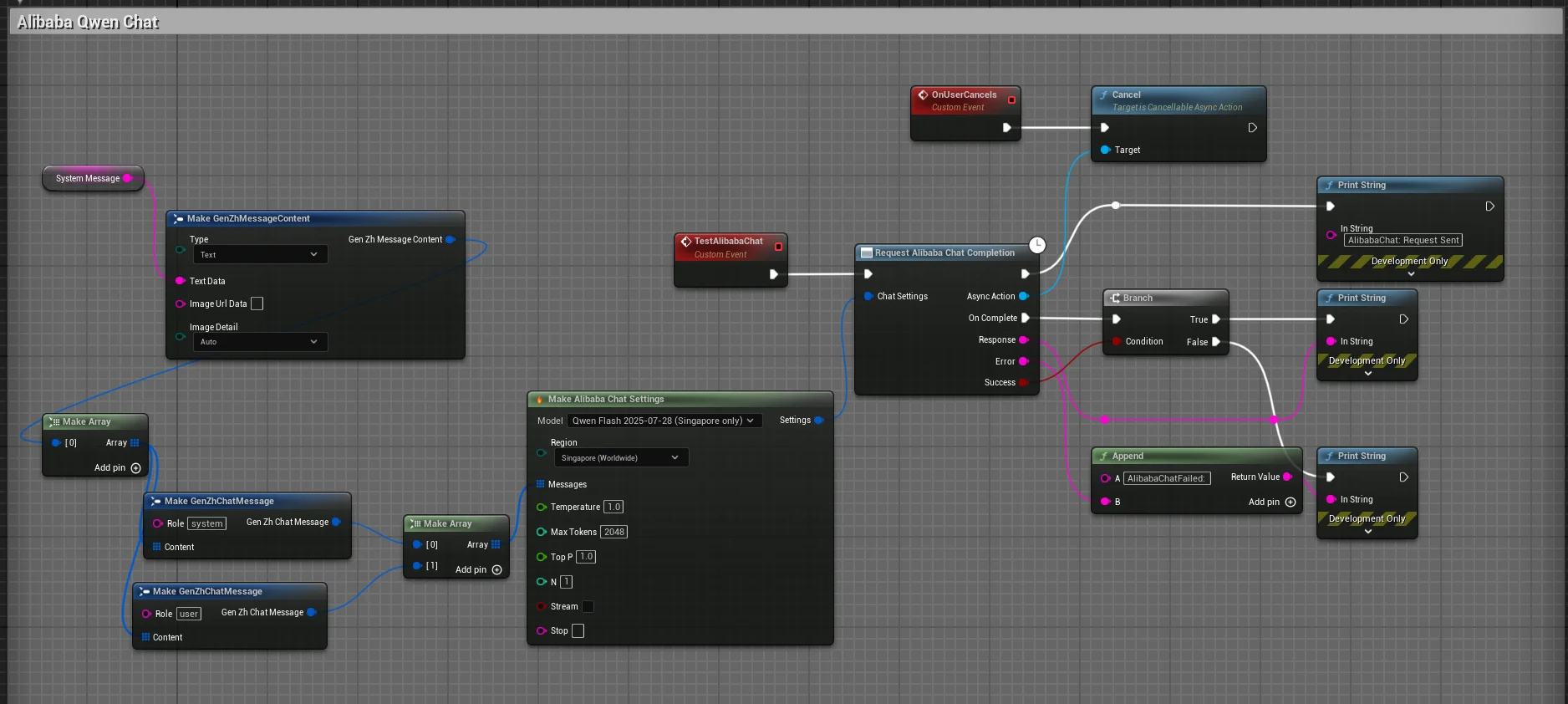
- Request Alibaba Chat Completion: The main latent node that initiates the API call.
- Settings: Use the
Make GenAI Alibaba Chat Settingsnode to get a dropdown list of supported models. - OnComplete (Event): This event pin fires when a response is received. It provides the final
Response, anError Message, and aSuccessboolean.
C++ Usage Walkthrough (Alibaba Chat)
The C++ workflow is clean and powerful, using a settings struct and a completion delegate. This pattern is consistent across all providers in the plugin.
#include "Models/Alibaba/GenZhAlibabaChat.h"
#include "Data/Alibaba/GenZhAlibabaChatStructs.h"
#include "Data/GenZhMessageStructs.h"

void AMyActor::SendSimpleChatRequest()
{
    // 1. Configure the request settings
    FGenZhAlibabaChatSettings ChatSettings;
    ChatSettings.Model = TEXT("qwen-plus");

    // 2. Create the message payload
    TArray<FGenZhChatMessage> Messages;
    FGenZhChatMessage Message;
    Message.Role = TEXT("user");
    Message.Content.Add(FGenZhMessageContent::FromText(TEXT("Tell me a short story.")));
    Messages.Add(Message);
    ChatSettings.Messages = Messages;

    // 3. Create a weak pointer for a safe callback
    TWeakObjectPtr<AMyActor> WeakThis(this);

    // 4. Send the request with a lambda for the callback
    UGenZhAlibabaChat::SendChatRequest(ChatSettings,
        FOnAlibabaChatCompletionResponse::CreateLambda([WeakThis](const FString& Response, const FString& Error, bool bSuccess)
        {
            // Always check if the calling object is still valid
            if (!WeakThis.IsValid()) return;

            if (bSuccess)
            {
                // Process the successful response
            }
            else
            {
                // Handle the error
            }
        })
    );
}
Find More Examples
Ready to dive deeper? The guides below provide detailed walkthroughs for specific features.