Text-to-Speech
Bring your characters and worlds to life with voice. The plugin provides a seamless pipeline to convert text into natural-sounding speech (TTS) using powerful AI models.
Currently Supported Providers
- Alibaba: Offers a range of high-quality, natural-sounding voices via the Qwen-TTS models.
Mac Shipping Note: For packaged Mac builds, if you run into mic input not being picked up or realtime/API connection failures (for example, connection status 0), copy cacert.pem from <UE_ENGINE_PATH>/Engine/Content/Certificates/ThirdParty into <Project>/Content/Certificates, then add that Certificates folder to both Additional Non-Asset Directories To Package and Additional Non-Asset Directories To Copy in Packaging settings.
Text-to-Speech (TTS)
Text-to-Speech allows you to dynamically generate voice lines from any string, perfect for creating expressive NPC dialogue, narration, or accessibility features without needing to pre-record audio files.
Blueprint Implementation (TTS)
The Blueprint workflow is designed to be simple: request the speech, convert the returned data, and play it as a sound.
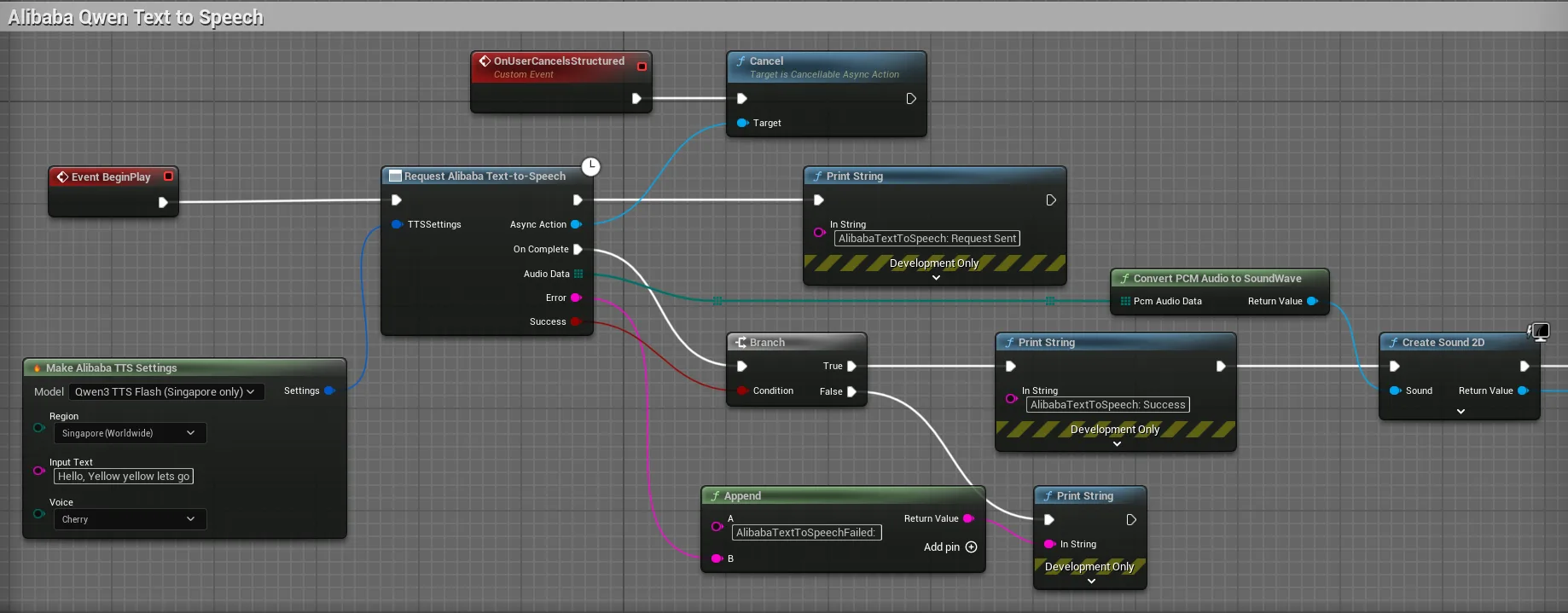
The key nodes are:
- Request Alibaba Text To Speech: This latent node sends the request. Use the
Make GenAI Alibaba TTS Settingsnode to configure the voice, model, and input text. - Convert PCM Audio To Sound Wave: A crucial helper node from the plugin that takes the raw PCM audio data from the API and correctly formats it into a playable
USoundWaveasset. - Play Sound 2D: A standard Unreal node to play the generated sound.
C++ Implementation (TTS)
#include "Models/Alibaba/GenZhAlibabaTextToSpeech.h"
#include "Data/Alibaba/GenZhAlibabaTextToSpeechStructs.h"
#include "Utilities/GenZhAudioUtils.h" // For the conversion utility
#include "Kismet/GameplayStatics.h"

void AMyActor::SpeakText(const FString& TextToSpeak)
{
    // 1. Configure the TTS request
    FGenZhAlibabaTTSSettings TTSSettings;
    TTSSettings.InputText = TextToSpeak;
    TTSSettings.Model = TEXT("qwen-tts");
    TTSSettings.Voice = EAlibabaAIVoice::Serena; // Choose a voice

    // 2. Send the request with a Lambda callback
    UGenZhAlibabaTextToSpeech::SendTextToSpeechRequest(TTSSettings,
        FOnAlibabaTTSCompletionResponse::CreateLambda([this](const TArray<uint8>& AudioData, const FString& ErrorMessage, bool bSuccess)
        {
            if (bSuccess && AudioData.Num() > 0)
            {
                // 3. Convert raw PCM data to a playable sound wave
                if (USoundWave* PlayableSound = UGenZhAudioUtils::ConvertPCMAudioToSoundWave(AudioData))
                {
                    // 4. Play the sound in the world
                    UGameplayStatics::PlaySound2D(this, PlayableSound);
                }
            }
            else
            {
                UE_LOG(LogTemp, Error, TEXT("TTS Error: %s"), *ErrorMessage);
            }
        })
    );
}
Audio Helper Utilities (UGenZhAudioUtils)
To simplify audio handling, the plugin includes a powerful set of helper functions available in both C++ and Blueprints. This class, UGenZhAudioUtils, handles the necessary data conversions to get audio into the formats required by Unreal Engine.
Here’s a brief overview of the most important function for TTS:
- Convert PCM Audio To SoundWave:
- What it does: This is the most essential function for TTS. It takes the raw PCM audio data returned by the AI provider and converts it into a standard, playable
USoundWaveasset. - When to use it: Always use this after a successful TTS request to make the audio playable in your game.
- What it does: This is the most essential function for TTS. It takes the raw PCM audio data returned by the AI provider and converts it into a standard, playable
Streaming TTS (Real-time Audio)
In addition to the standard TTS workflow above, the plugin now supports Streaming TTS for Alibaba models. Instead of waiting for the entire audio to generate, streaming TTS delivers audio in real-time chunks as it’s generated — perfect for low-latency voice experiences.
Supported Models
qwen-tts,qwen3-tts-flash(and their versioned variants)
Supported Output Formats
- PCM (raw audio data)
- WAV (standard waveform audio)
- MP3 (compressed audio)
How It Works
Streaming TTS uses a persistent connection and fires events as audio chunks arrive:
- AudioChunk — A new chunk of decoded audio bytes has arrived. Buffer or play it immediately.
- Completed — The stream has finished. All audio has been delivered.
- Error — An error occurred during streaming.
Blueprint Implementation (Streaming TTS)
Use the “Request Alibaba Text To Speech Stream” node. It exposes an OnEvent pin that fires for each audio chunk, similar to how streaming chat works. Configure it with the Make GenAI Alibaba TTS Settings node, specifying your desired voice, model, and input text.
C++ Implementation (Streaming TTS)
#include "Models/Alibaba/GenZhAlibabaTextToSpeechStream.h"
#include "Data/Alibaba/GenZhAlibabaTextToSpeechStructs.h"

void AMyActor::StreamTTS(const FString& TextToSpeak)
{
    FGenZhAlibabaTTSSettings TTSSettings;
    TTSSettings.InputText = TextToSpeak;
    TTSSettings.Model = TEXT("qwen3-tts-flash");
    TTSSettings.Voice = EAlibabaAIVoice::Serena;

    TWeakObjectPtr<AMyActor> WeakThis(this);
    UGenZhAlibabaTextToSpeechStream::SendStreamTTSRequest(TTSSettings,
        FOnAlibabaTTSStreamResponse::CreateLambda([WeakThis](const FGenZhAlibabaTTSStreamEvent& Event)
        {
            if (!WeakThis.IsValid()) return;

            switch (Event.EventType)
            {
                case EGenZhAlibabaTTSStreamEventType::AudioChunk:
                    // Buffer or play the audio chunk
                    // Event.AudioDataChunk contains the decoded audio bytes
                    break;
                case EGenZhAlibabaTTSStreamEventType::Completed:
                    UE_LOG(LogTemp, Log, TEXT("Streaming TTS Complete!"));
                    break;
                case EGenZhAlibabaTTSStreamEventType::Error:
                    UE_LOG(LogTemp, Error, TEXT("TTS Error: %s"), *Event.ErrorMessage);
                    break;
            }
        })
    );
}
Audio Format Notes
- TTS Output (Non-Streaming): The non-streaming TTS node returns raw WAV audio bytes (includes header). Use
ConvertPCMAudioToSoundWaveto convert it into a playableUSoundWave. - Streaming TTS Output: Supports PCM, WAV, MP3, and Opus formats, configurable in the TTS Streaming Settings. When using PCM format, each
AudioDataChunkcontains raw PCM 16-bit signed little-endian, mono audio at your configuredSampleRate(default 24000). Set your Procedural Sound Wave’sSampleRateandNumChannels=1accordingly.