Building Long Conversations
Creating believable, stateful conversations is a cornerstone of compelling AI characters. This guide covers the principles and techniques for managing conversation history, ensuring your NPCs can remember past interactions and respond intelligently.
The Core Concept: Overcoming Statelessness
By default, large language models are stateless. This means they have no memory of previous interactions. Each API request is treated as an isolated event. To create the illusion of memory, you must manually send the entire conversation history with every new request.
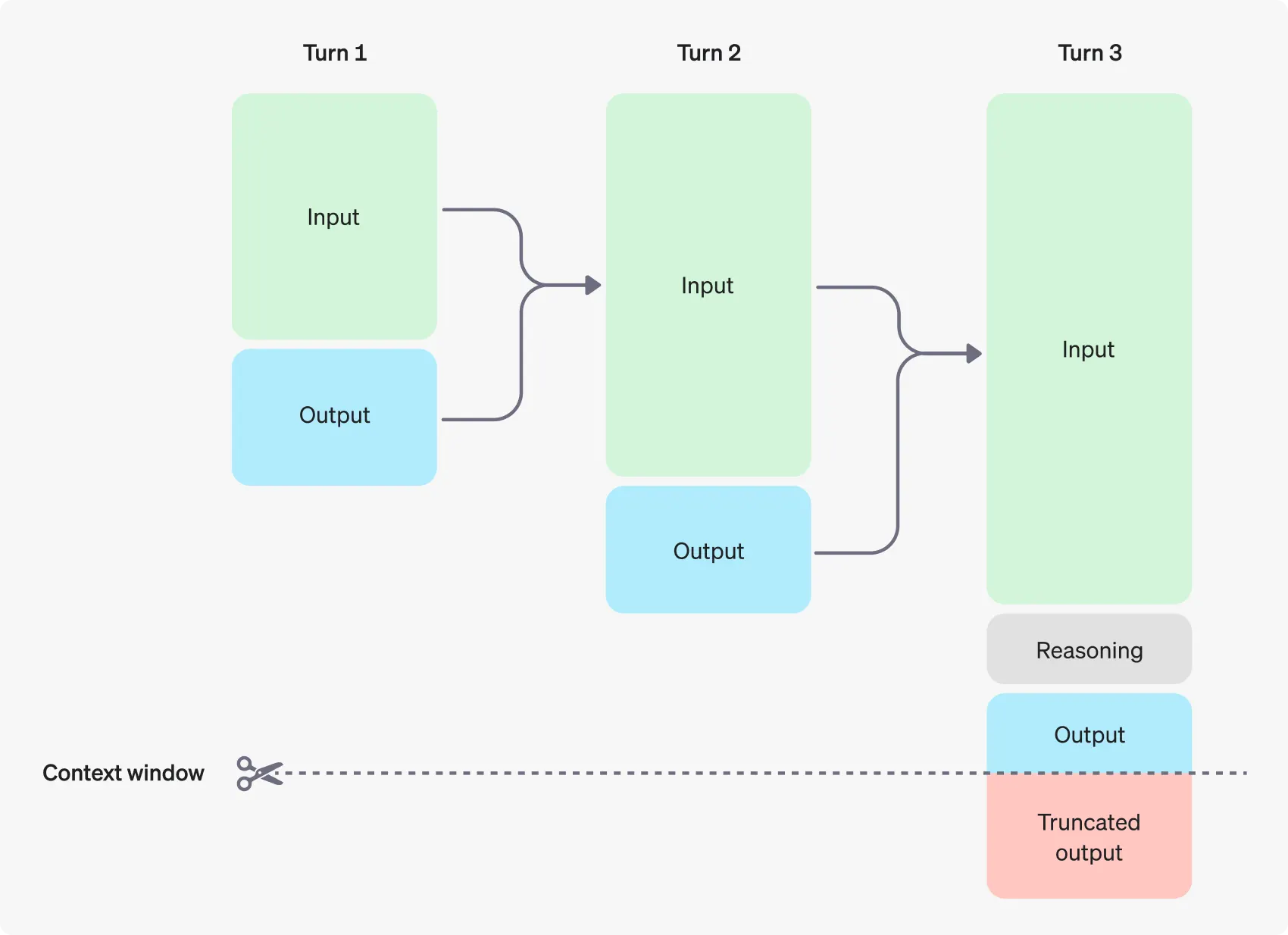
The process looks like this:
- Initial Prompt: Start the conversation, usually with a hidden “system” message that defines the AI’s personality and a “user” message from the player.
- Send & Receive: Send this initial history to the API and get a response.
- Append History: Add the AI’s response (as an “assistant” message) to your history array.
- Repeat: For the next turn, add the new user message to the history and send the entire, updated array back to the API.
This growing array of messages is called the conversation context.
Multimodal Conversations
The GenZh Chat Message struct also supports multimodal inputs. For providers like Alibaba and Bytedance, you can include image data directly in a message alongside text. This allows you to create AI that can “see” and comment on in-game screenshots or other visual information.
Blueprint Implementation
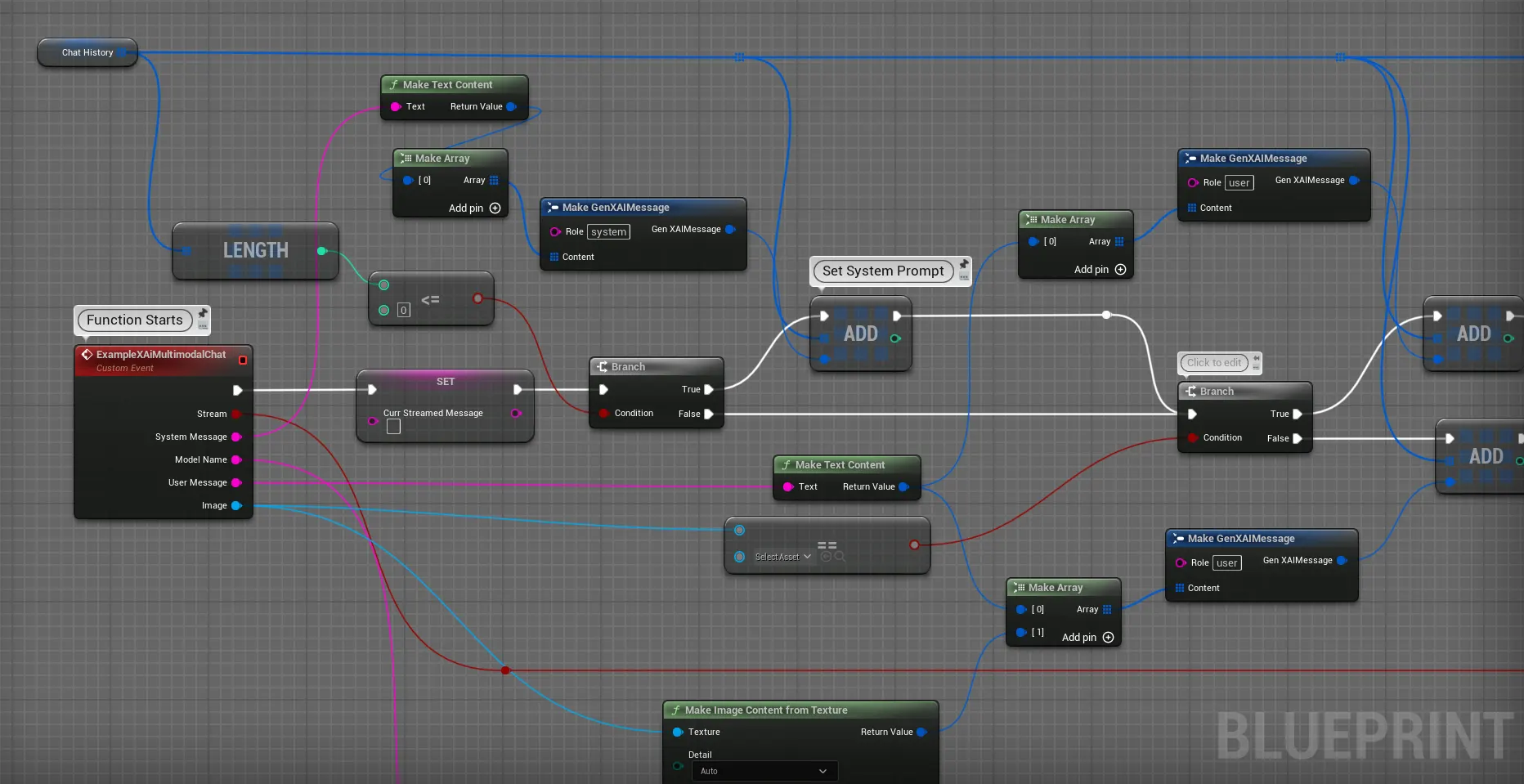
In Blueprints, you manage the conversation context using an array of the GenZh Chat Message struct.
-
Create a History Variable: In your Blueprint (e.g., an Actor or Actor Component), create a new variable. Set its type to
GenZh Chat Messageand make it an Array. Let’s name itConversationHistory. -
Build and Send the Request: When the player sends a message, you add it to the
ConversationHistoryarray and then feed the entire array into theRequest Alibaba Chatnode. -
Update History with the Response: On the
OnCompleteevent, you take the response message, create a newGenZh Chat Messagewith theAssistantrole, and add it to yourConversationHistoryarray.
C++ Implementation
The C++ implementation follows the same logic, managing a TArray<FGenZhChatMessage>.
// In your AConversationalNpc.h
#pragma once

#include "CoreMinimal.h"
#include "GameFramework/Actor.h"
#include "Data/GenZhMessageStructs.h" // Needed for FGenZhChatMessage
#include "AConversationalNpc.generated.h"

UCLASS()
class YOURGAME_API AConversationalNpc : public AActor
{
    GENERATED_BODY()

public:
    // Call this to start the conversation with a defining system prompt
    UFUNCTION(BlueprintCallable)
    void InitializeConversation(const FString& SystemPrompt);

    // Call this when the player speaks to the NPC
    UFUNCTION(BlueprintCallable)
    void HandlePlayerMessage(const FString& PlayerInput);

private:
    // Stores the entire conversation history
    TArray<FGenZhChatMessage> ConversationHistory;

    void SendChatRequest();
    void OnAIResponseReceived(const FString& Response, const FString& Error, bool bSuccess);
};

// In your AConversationalNpc.cpp
#include "Models/Alibaba/GenZhAlibabaChat.h"
#include "Data/Alibaba/GenZhAlibabaChatStructs.h"

void AConversationalNpc::InitializeConversation(const FString& SystemPrompt)
{
    ConversationHistory.Empty();
    FGenZhChatMessage SystemMessage;
    SystemMessage.Role = TEXT("system");
    SystemMessage.Content.Add(FGenZhMessageContent::FromText(SystemPrompt));
    ConversationHistory.Add(SystemMessage);
}

void AConversationalNpc::HandlePlayerMessage(const FString& PlayerInput)
{
    // Add the player's message to our history
    FGenZhChatMessage UserMessage;
    UserMessage.Role = TEXT("user");
    UserMessage.Content.Add(FGenZhMessageContent::FromText(PlayerInput));
    ConversationHistory.Add(UserMessage);

    SendChatRequest();
}

void AConversationalNpc::SendChatRequest()
{
    FGenZhAlibabaChatSettings ChatSettings;
    ChatSettings.Model = TEXT("qwen-plus"); // Choose your model
    ChatSettings.Messages = ConversationHistory;

    TWeakObjectPtr<AConversationalNpc> WeakThis(this);

    // Send the entire conversation history with the request
    UGenZhAlibabaChat::SendChatRequest(ChatSettings,
        FOnAlibabaChatCompletionResponse::CreateLambda(
        [WeakThis](const FString& Response, const FString& Error, bool bSuccess)
        {
            if (!WeakThis.IsValid()) return;
            WeakThis->OnAIResponseReceived(Response, Error, bSuccess);
        })
    );
}

void AConversationalNpc::OnAIResponseReceived(
    const FString& Response, const FString& Error, bool bSuccess)
{
    if (bSuccess)
    {
        // Add the AI's response to our history to maintain context for the next turn
        FGenZhChatMessage AssistantMessage;
        AssistantMessage.Role = TEXT("assistant");
        AssistantMessage.Content.Add(FGenZhMessageContent::FromText(Response));
        ConversationHistory.Add(AssistantMessage);

        // Now, display the message to the player, play audio, etc.
        // ...
    }
    else
    {
        // Handle the error appropriately
        UE_LOG(LogTemp, Error, TEXT("AI Chat Error: %s"), *Error);
    }
}