Core Concepts
This section covers the fundamental design principles of the Gen AI China plugin. Understanding these concepts will help you use the plugin effectively and avoid common pitfalls.
1. Finding and Using Plugin Nodes
The plugin follows a consistent naming convention to make its features easily discoverable.
In Blueprints
All asynchronous Blueprint nodes start with “Request” followed by the provider and the service. You can find any function by simply searching for this pattern in the Blueprint context menu.
Request Alibaba Chat CompletionRequest Bytedance Image GenerationRequest MoonshotAI Chat StreamRequest ZhipuAI Chat CompletionRequest Baidu Chat Completion
In C++
The static C++ functions follow a similar pattern, typically starting with “Send”.
UGenZhAlibabaChat::SendChatRequest(...)UGenZhBytedanceImageGeneration::SendImageGenerationRequest(...)UGenZhMoonshotAIChatStream::SendStreamChatRequest(...)UGenZhZhipuAIChat::SendChatRequest(...)UGenZhBaiduChat::SendChatRequest(...)
2. Unified Settings Structs & Model Selection
Every API request is configured using a dedicated Settings struct (e.g., FGenZhAlibabaChatSettings). In Blueprints, you use a “Make…“ node to create these structs. To make model selection easy and reliable, the plugin uses a powerful feature of the Unreal Editor.
The Model Dropdown
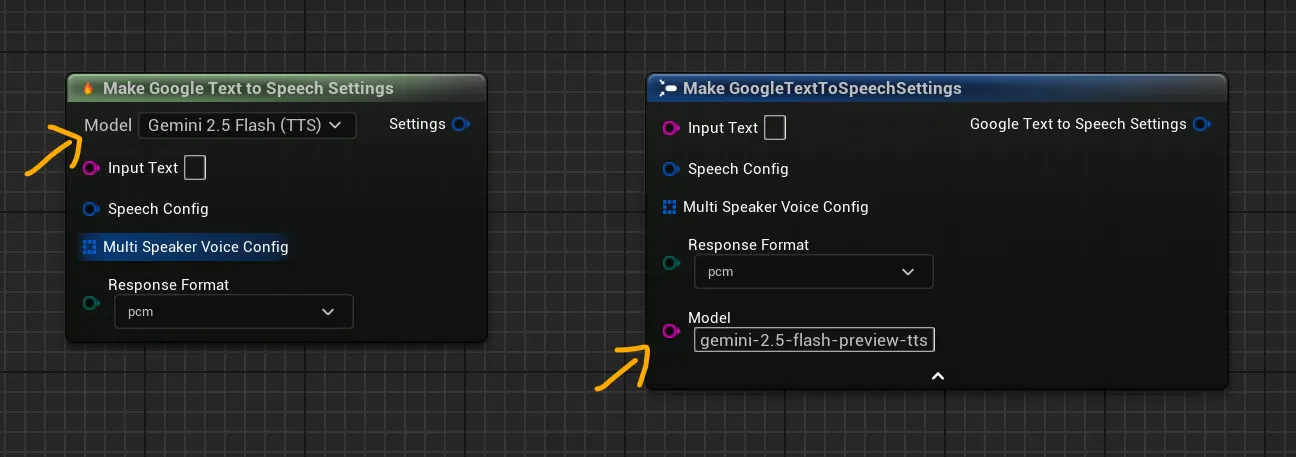
The “Make…“ nodes for settings feature a dropdown menu that is dynamically populated with all the known supported models for that provider and service. This is possible thanks to an internal Model Registry that reads from a list of official models. This is the easiest and recommended way to select a model, as it prevents typos and ensures you are using a valid model ID.
Custom Model String
For maximum flexibility, you can also type a model’s exact API ID directly into the Model input field on the struct. This is useful for:
- Using a brand-new model that hasn’t been added to the dropdown yet.
- Dynamically selecting a model at runtime based on a variable.
Important: The string input will always override the enum dropdown if both are set.
Bytedance VolcEngine (China Region): Model ID Prefix
⚠️ Attention: Mainland China Users
If you are accessing Bytedance models from Mainland China (Volcanic Engine / 火山引擎), the model IDs require a doubao- prefix. This does not apply to users on the international BytePlus platform.
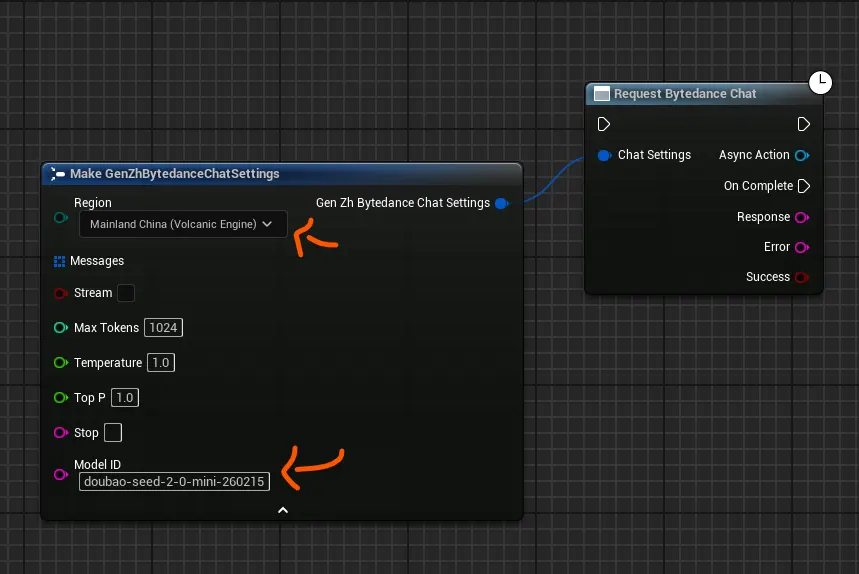
When using the Mainland China (Volcanic Engine) region for Bytedance, the API expects model names with a doubao- prefix. Our catalog uses the base model name, so you need to enter the full prefixed ID in the Model ID field. Here is a reference:
| Our Catalog Name | Bytedance’s Actual API ID (China) |
|---|---|
seed-2-0-mini-260215 |
doubao-seed-2-0-mini-260215 |
seed-2-0-lite-260228 |
doubao-seed-2-0-lite-260228 |
seed-1-6-250615 |
doubao-seed-1-6-250615 |
deepseek-v3-1-250821 |
doubao-deepseek-v3-1-250821 |
seedream-4-0-250828 |
doubao-seedream-4-0-250828 |
| …etc | …etc |
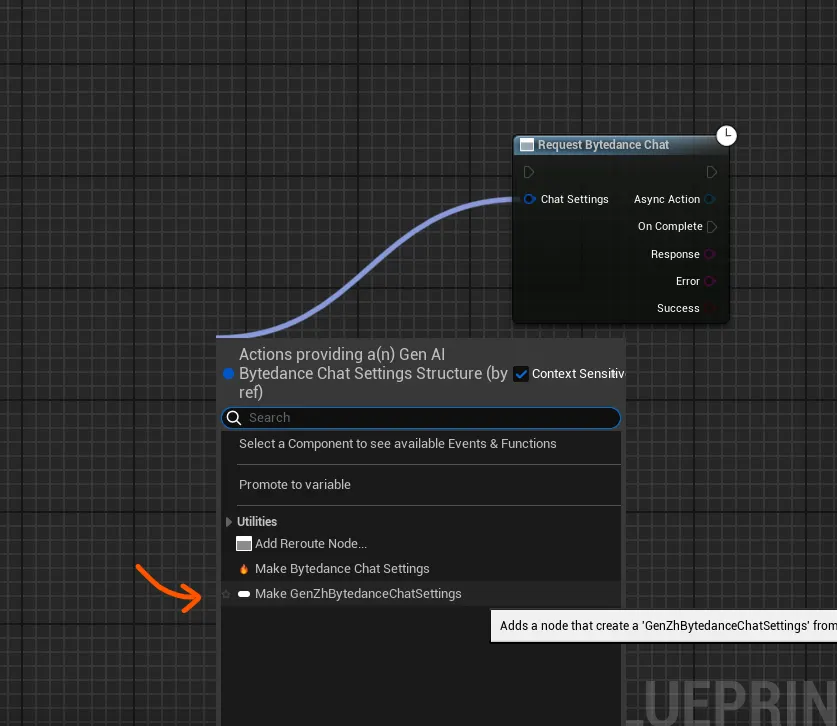
To do this in Blueprints, use the Make GenZhBytedanceChatSettings node and type the full doubao- prefixed model ID into the Model ID string field.
Note: This will be automatically handled in a future plugin update. Until then, please manually add the
doubao-prefix for Mainland China region models.
3. Asynchronous by Design
All API calls in this plugin are asynchronous (non-blocking). This is essential to prevent your game from freezing while it waits for a response from a web server. The workflow is always:
- You call a function to send a request.
- You provide a callback delegate (in C++) or connect to an event pin (in Blueprints).
- Your game continues running without interruption.
- When the response arrives, your callback function or event is executed with the result.
4. Automatic Lifetime Management
A critical challenge in Unreal with asynchronous operations is Object Lifetime. If an Actor is destroyed while a request is still in-flight, the callback can try to access invalid memory, causing a crash. The plugin solves this automatically for you.
Blueprint Solution: Built-in Safety
Blueprint nodes are built on UCancellableAsyncAction and are inherently safe. They use weak pointers to track the calling object and will automatically skip the callback if the object has been destroyed.
C++ Solution: Developer-Managed Safety
When calling the static C++ functions, you are responsible for managing lifetime. The required pattern is to capture a TWeakObjectPtr in your callback lambda.
// Essential C++ safety pattern
void AMyActor::RequestData()
{
    TWeakObjectPtr<AMyActor> WeakThis(this);
    UGenZhAlibabaChat::SendChatRequest(Settings,
        FOnAlibabaChatCompletionResponse::CreateLambda([WeakThis](/*...params...*/)
        {
            // CRITICAL: Always check if the object is still valid.
            if (!WeakThis.IsValid()) return;
            WeakThis->HandleResponse(/*...params...*/);
        })
    );
}
5. Extended Debug Mode
To help with troubleshooting, the plugin includes an Extended Logging Mode. When enabled, every API request and response will be printed to the Unreal output log.
- What it Logs: The full request body (including headers and parameters) and the full response from the server.
- Security: To prevent log spam and protect data, any
base64encoded strings (typically used for images) will be truncated in the log output. - How to Enable:
- Go to Project Settings > Plugins > GenAI Chinese Models.
- Find the “Enable Extended Logging Mode” checkbox and enable it.
This is an invaluable tool for debugging issues with your API calls without needing external network monitoring tools.