Chat Completions
Chat completions are the core of conversational AI in the Gen AI China plugin. This page covers how to send text-based and multimodal chat requests to the supported Chinese AI providers.
1. Basic Text Chat
The simplest way to interact with AI models is through text-only chat completions. Send a series of messages (system prompt, user input, assistant responses) and receive a generated response.
In Blueprints
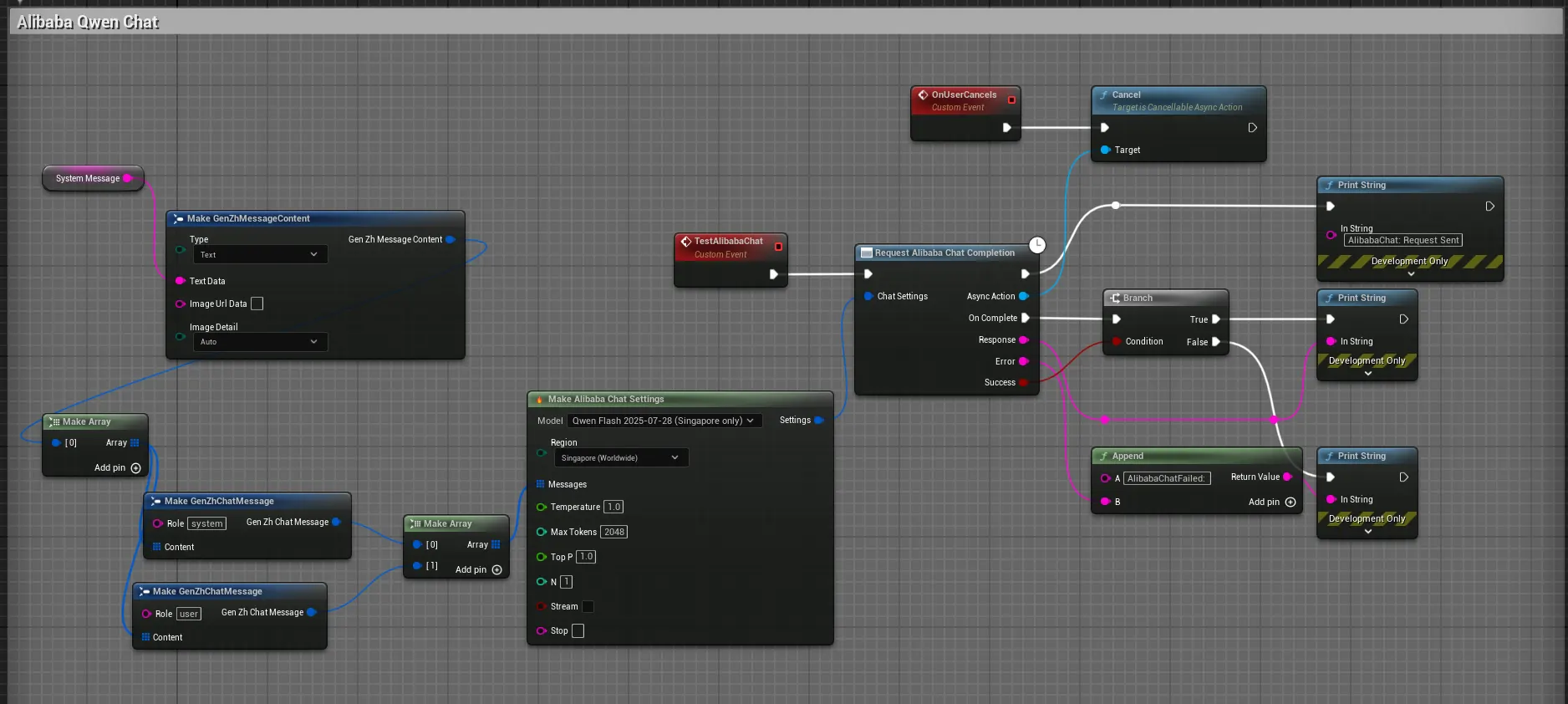
Use the “Request [Provider] Chat Completion” node for the provider you want, such as Request Alibaba Chat Completion or Request Bytedance Chat. You’ll need to provide:
- Settings: Use a “Make…“ node (e.g.,
Make GenZhAlibabaChatSettings) to configure model selection, temperature, max tokens, region, etc. - Messages: An array of
GenZh Chat Messagestructs with role (system/user/assistant) and content. - OnComplete: An event pin that fires with the
Response,Error, andSuccessvalues.
In C++
Use the static function from the provider’s chat class:
#include "Models/Alibaba/GenZhAlibabaChat.h"
#include "Data/Alibaba/GenZhAlibabaChatStructs.h"
#include "Data/GenZhMessageStructs.h"

void AMyActor::SendSimpleChatRequest()
{
    FGenZhAlibabaChatSettings ChatSettings;
    ChatSettings.Model = TEXT("qwen-plus");

    TArray<FGenZhChatMessage> Messages;
    FGenZhChatMessage Message;
    Message.Role = TEXT("user");
    Message.Content.Add(FGenZhMessageContent::FromText(TEXT("Tell me a short story.")));
    Messages.Add(Message);
    ChatSettings.Messages = Messages;

    TWeakObjectPtr<AMyActor> WeakThis(this);

    UGenZhAlibabaChat::SendChatRequest(ChatSettings,
        FOnAlibabaChatCompletionResponse::CreateLambda([WeakThis](const FString& Response, const FString& Error, bool bSuccess)
        {
            if (!WeakThis.IsValid()) return;

            if (bSuccess)
            {
                // Process the response
            }
            else
            {
                // Handle the error
            }
        })
    );
}
2. Multimodal Chat (Vision)
Several providers support multimodal inputs, allowing you to include images alongside text in your chat messages. This enables use cases like analyzing in-game screenshots or creating environment-aware NPC interactions.
Supported Providers
- Alibaba (Qwen VL models)
- Bytedance (Seed models)
- ZhipuAI (GLM-V models)
Use the UGenZhContentFactory to construct messages with both text and image content parts.
3. Bytedance VolcEngine (China Region): Model ID Prefix
When using the Mainland China (Volcanic Engine) region for Bytedance, the API expects model names with a doubao- prefix. Our catalog auto applies these model names and send something like this below.
| Our Catalog Name | Bytedance’s Actual API ID (China) |
|---|---|
seed-2-0-mini-260215 |
doubao-seed-2-0-mini-260215 |
seed-2-0-lite-260228 |
doubao-seed-2-0-lite-260228 |
seed-1-6-250615 |
doubao-seed-1-6-250615 |
deepseek-v3-1-250821 |
doubao-deepseek-v3-1-250821 |
seedream-4-0-250828 |
doubao-seedream-4-0-250828 |
| …etc | …etc |
Contact our support if you run into any issues
4. Streaming Chat Responses
For real-time chat experiences, use the streaming versions of chat nodes. These provide incremental responses as they’re generated, perfect for typewriter effects and responsive AI companions.
See the Streaming page for detailed information on implementing streaming chat.
5. Best Practices
- Message History: Maintain conversation context by including previous messages in the array. See Building Long Conversations.
- System Prompts: Use system messages to set the AI’s behavior and role.
- Token Limits: Monitor token usage to avoid hitting API limits and manage costs.
- Error Handling: Always check the
Successboolean and handle errors gracefully. - Use Streaming: For any real-time chat interface, use streaming to provide immediate feedback.