Image Generation
Integrate powerful AI image generation directly into your Unreal Engine projects. This feature allows you to create high-quality visual assets from simple text prompts, opening up incredible possibilities for procedural content, rapid prototyping, and dynamic in-game experiences.
- Supported Providers: Alibaba (Qwen, Wanx), Bytedance (Seedream).
- Use Cases: Generating concept art, dynamic in-game textures, player avatars, or placeholder assets.
Blueprint Implementation
The Blueprint workflow is straightforward: specify a text prompt and other settings, and the node returns the raw image data as a byte array. You can then convert this data into a Texture2D for display in UMG or application on materials.
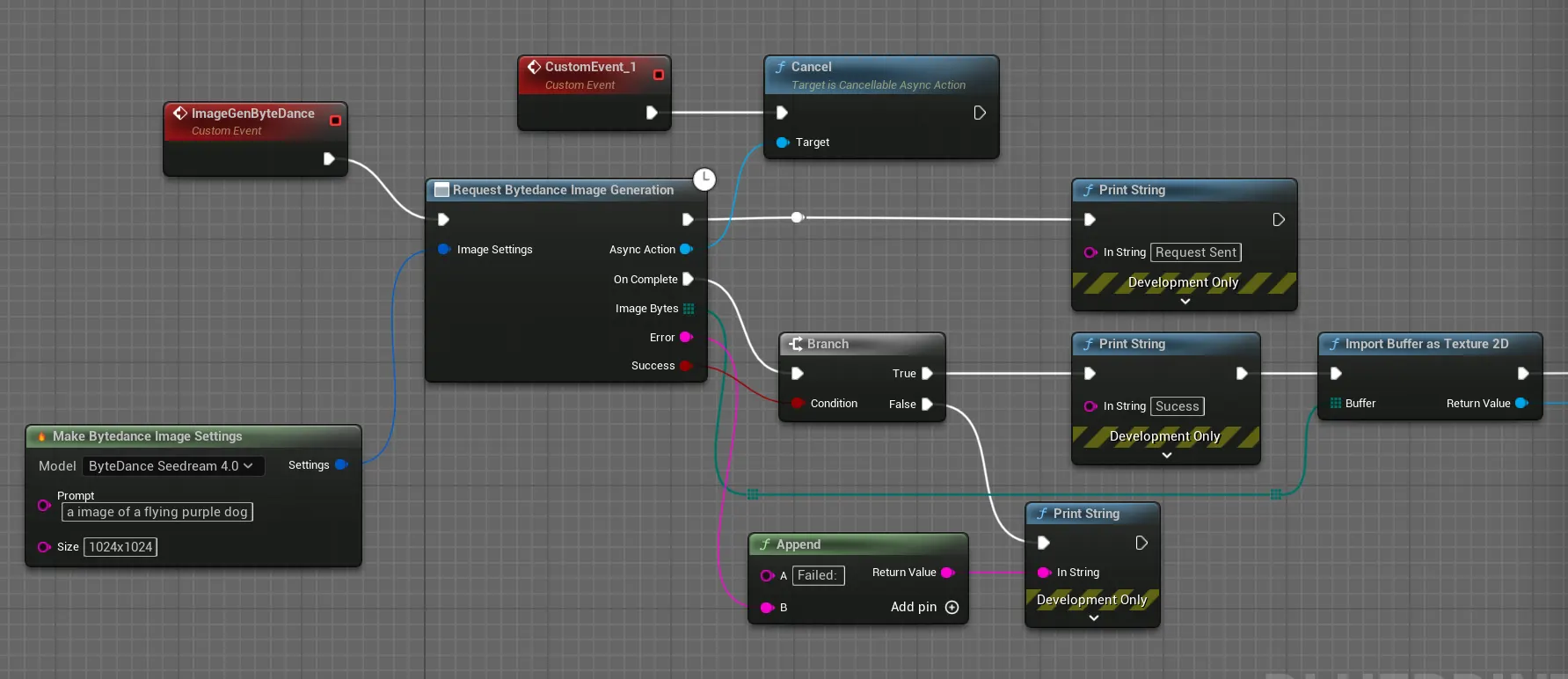
The key nodes are:
- Request Alibaba Image Generation: The latent node that sends the request. Use the
Make GenAI Alibaba Image Settingsnode to configure thePrompt,Model, andSize. - (OnComplete) Load Image from TArray: A standard engine node that can convert a byte array of PNG or JPG data into a
Texture2D. - (Then) Set Brush from Texture: A UMG helper to display the newly created texture in an
Imagewidget.
C++ Implementation (Alibaba)
You can call the image generation functions directly from C++ for more control. The process involves sending the request and, in the callback, saving the returned image bytes to a file or loading them as a texture.
#include "Models/Alibaba/GenZhAlibabaImageGeneration.h"
#include "Data/Alibaba/GenZhAlibabaImageStructs.h"
#include "Misc/FileHelper.h"
#include "Misc/Paths.h"

void AMyImageGenerator::GenerateImageFromPrompt(const FString& PromptText)
{
    // 1. Configure the image generation settings
    FGenZhAlibabaImageSettings ImageSettings;
    ImageSettings.Prompt = PromptText;
    ImageSettings.Model = TEXT("qwen-image");
    ImageSettings.Size = TEXT("1024*1024");

    // 2. Send the request and handle the response in a Lambda
    UGenZhAlibabaImageGeneration::SendImageGenerationRequest(ImageSettings,
        FOnAlibabaImageGenerationCompletionResponse::CreateLambda([this](const TArray<uint8>& ImageBytes, const FString& ErrorMessage, bool bSuccess)
        {
            if (bSuccess && ImageBytes.Num() > 0)
            {
                // Example: Save the image to a file
                const FString FilePath = FPaths::ProjectSavedDir() / TEXT("AI_Images") / FString::Printf(TEXT("GeneratedImage_%s.png"), *FDateTime::Now().ToString());
                FFileHelper::SaveArrayToFile(ImageBytes, *FilePath);

                // You could also load the bytes into a texture here for in-game use
            }
            else
            {
                UE_LOG(LogTemp, Error, TEXT("Image generation failed: %s"), *ErrorMessage);
            }
        })
    );
}