Blueprint Nodes
This is the reference for every Blueprint node the plugin adds. All nodes work with Ollama, OpenAI-compatible servers (LM Studio, vLLM, LocalAI, Jan, llama.cpp server), and Embedded (llama.cpp) — pick your provider on the node’s Chat Settings > Connection > Provider pin.
If you’re just getting started, the Quick Start walks through the minimum wiring end-to-end. This page is for reference once you’re past that.
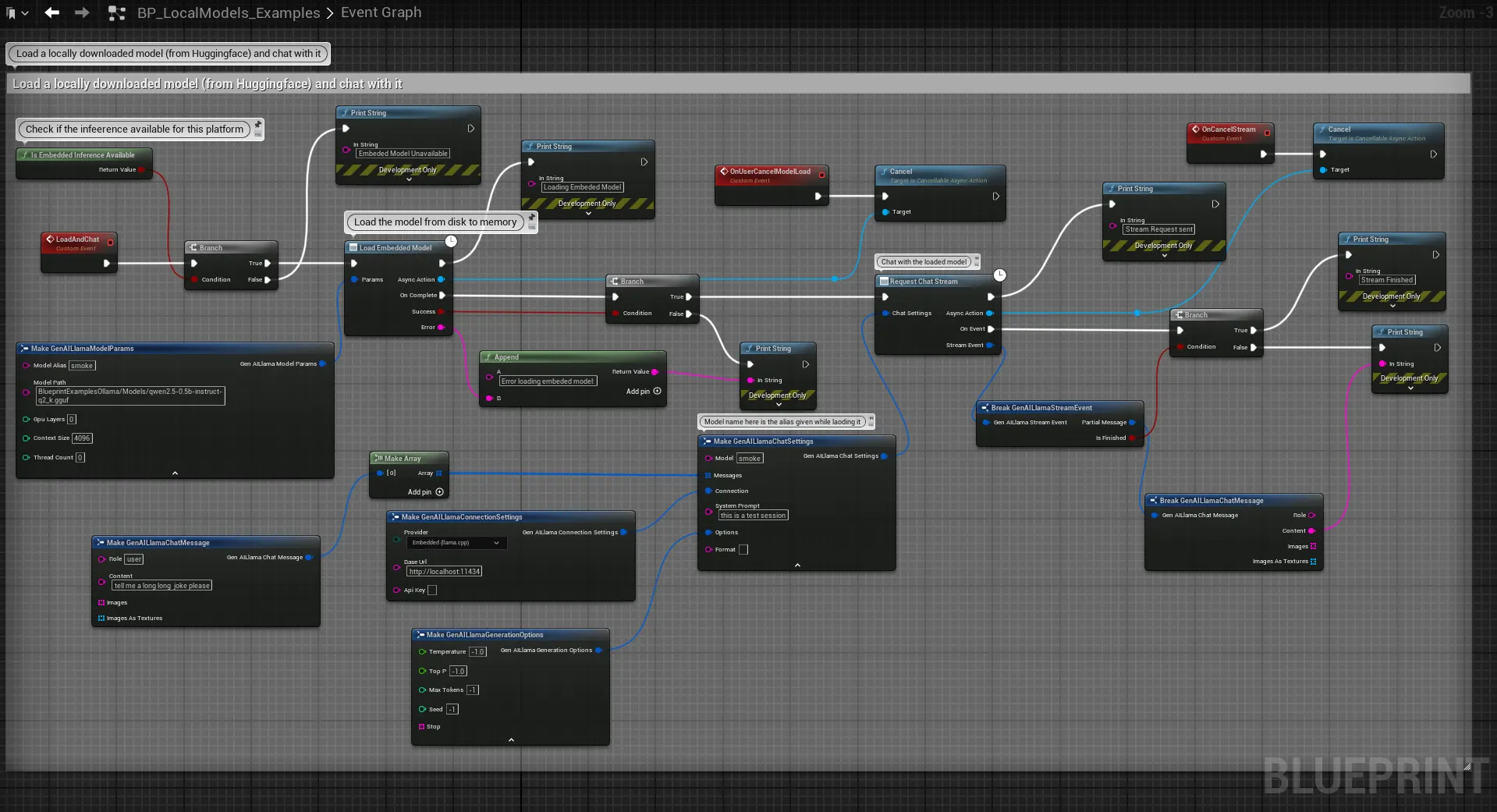
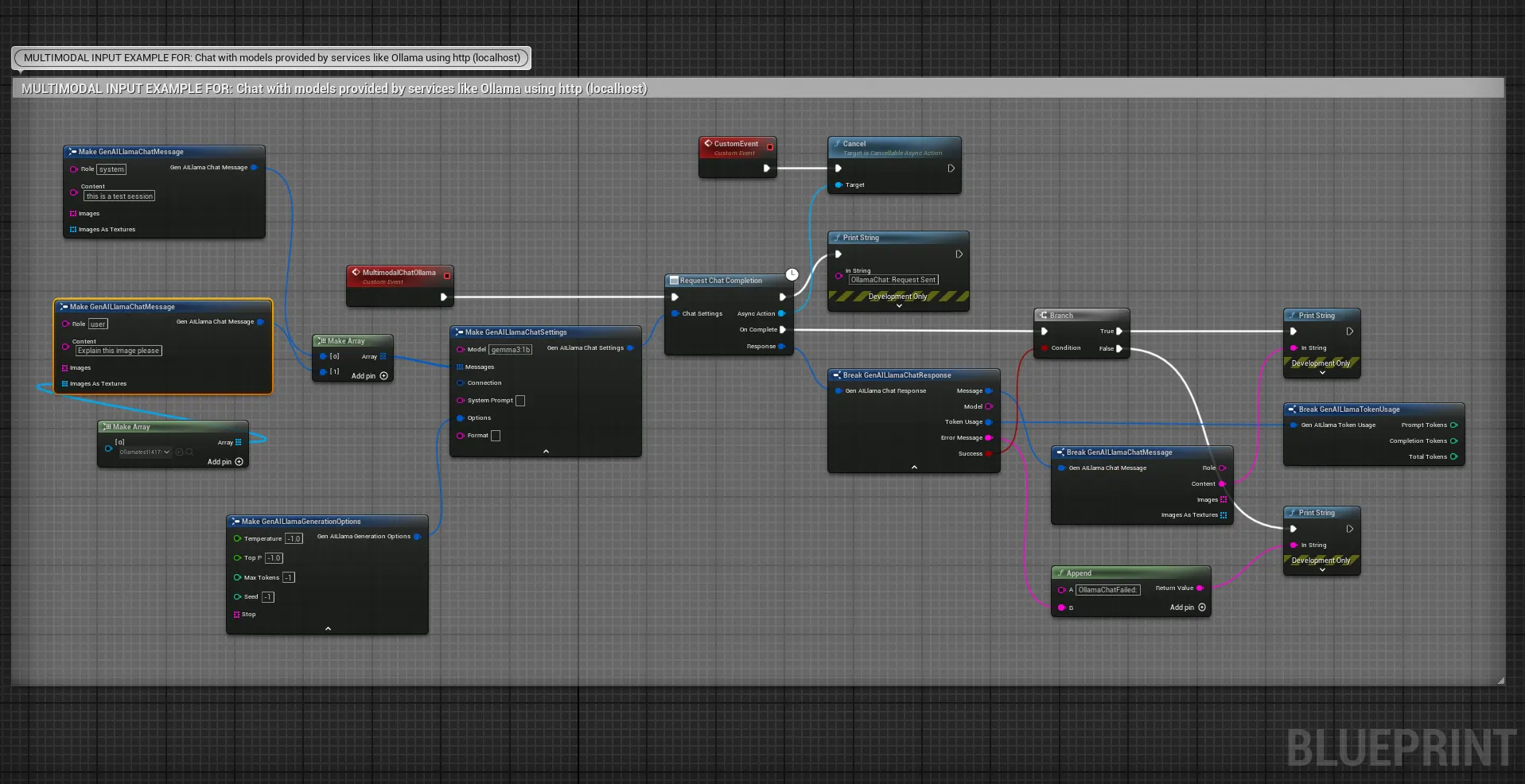
Chat Nodes
Request Chat Completion
Sends a chat request and returns a single complete response. Works with all providers.
Category: GenAI Llama > Chat
Inputs:
| Pin | Type | Description |
|---|---|---|
| Chat Settings | FGenAILlamaChatSettings |
Model, messages, connection, generation options. See Chat Settings below. |
Output delegate — On Complete fires with FGenAILlamaChatResponse:
| Field | Type | Description |
|---|---|---|
Message |
FGenAILlamaChatMessage |
Assistant’s response (Role + Content). |
Model |
FString |
Model name that generated the response. |
TokenUsage |
FGenAILlamaTokenUsage |
Prompt tokens, completion tokens, total. |
ErrorMessage |
FString |
Error details if the request failed. |
bSuccess |
bool |
Whether the request succeeded. |
Minimum wiring:
Event BeginPlay→Request Chat Completion- Set
Chat Settings > Model=llama3(or your model name/alias) - Set
Chat Settings > Connection > Provider=Ollama - Set
Chat Settings > Messages= one entry with Roleuserand your prompt as Content On Complete→Print Stringwired toResponse > Message > Content
Request Chat Stream
Receives the response token-by-token for real-time display. Works with all providers.
Category: GenAI Llama > Chat
Inputs: Same as Request Chat Completion.
Output delegate — On Event fires for each token with FGenAILlamaStreamEvent:
| Field | Type | Description |
|---|---|---|
PartialMessage |
FGenAILlamaChatMessage |
The token’s content (Role + Content). Append to a running string for the typewriter effect. |
bIsFinished |
bool |
true on the final event in the stream. |
Tips:
- On every
On Event, appendPartialMessage > Contentto a String variable. Drive a UMG Text Block from that variable to get a live streaming UI. - Check
bIsFinishedto know when generation is done (e.g. to re-enable a “Send” button). - Call
Cancel()on the async action node to abort an in-flight stream.
Embedded Inference Nodes
These nodes only work when llama.cpp libraries are present — otherwise they return errors. See Embedded Inference Setup to enable them.
Load Embedded Model
Asynchronously loads a .gguf model file into memory for in-process inference. Must be called before you use the model with Request Chat Completion / Request Chat Stream.
Category: GenAI Llama > Embedded
Inputs:
| Pin | Type | Default | Description |
|---|---|---|---|
Model Alias |
FString |
— | A short name you choose to reference this model later (e.g. npc-brain). Used as the Model field in Chat Settings when provider is Embedded. |
Model Path |
FString |
— | Path to the .gguf file. Absolute, or relative to the project root (Content/Models/foo.gguf is the typical shape). Windows only: the path must be ASCII-only — llama.cpp cannot open paths containing Cyrillic / CJK / emoji characters. |
GPU Layers |
int32 |
99 |
Layers to offload to GPU. 0 = CPU only, 99 = all layers. If your GPU has less VRAM than the model file, full offload can abort the process — drop this to a partial value or 0 to fall back to CPU. |
Context Size |
int32 |
2048 |
Max context window in tokens. Larger values use more RAM/VRAM (KV cache grows linearly). 131072 is the hard cap but rarely usable on consumer hardware — pair high values with a small model. |
Thread Count |
int32 |
0 |
CPU threads. 0 = auto-detect (recommended). |
Output delegate — On Complete:
| Field | Type | Description |
|---|---|---|
bSuccess |
bool |
Whether the model loaded. |
Error |
FString |
Error detail if bSuccess is false. |
Pre-flight checks. Before calling into llama.cpp, the node validates the load and returns an actionable error rather than letting the inference engine crash the process:
- File missing —
Model file not found: <path>. - Non-ASCII path on Windows —
Model path contains non-ASCII characters, which llama.cpp cannot open on Windows: <path>. Move the.ggufto an ASCII-only path (e.g.C:\Models\). - CPU-only load larger than RAM —
Model file is X.XX GiB but only Y.YY GiB of system RAM is available, and GpuLayers=0 (CPU only).RaiseGPU Layers, use a smaller quantization, or close other apps. - Full GPU offload on a very large file — a log warning is emitted (
Loading a X.XX GiB model with GpuLayers=99...) when the file exceeds 8 GiB and full offload is requested. If VRAM is insufficient, llama.cpp may abort the process; lowerGPU Layersto do a partial offload.
Common gotchas:
- GPU Layers > 0 on a machine without a GPU backend — fails with a backend allocation error. The pre-flight catches the obvious OOM case, but not a missing
ggml-cuda.dll/ggml-vulkan.dll— check the Output Log for[llama.cpp]lines. - Path resolution — relative paths are resolved from the project root, not the editor binary.
Content/Models/foo.ggufis the typical shape. - Loading twice with the same alias — the second call returns immediately with
bSuccess=truewithout reloading. CallUnload Embedded Modelfirst if you want fresh parameters.
Unload Embedded Model
Unloads a previously loaded model by alias and frees its memory.
Inputs:
| Pin | Type | Description |
|---|---|---|
Model Alias |
FString |
The alias you passed to Load Embedded Model. |
Unload All Embedded Models
Unloads every loaded model and frees all embedded-inference memory. Call this on level teardown if you don’t want the models to persist.
Get Loaded Embedded Models
Returns the aliases of every currently loaded embedded model. Useful for populating a dropdown of already-loaded models before starting a chat.
Category: GenAI Llama > Embedded
Output: TArray<FString> — aliases.
Get Loaded Embedded Models Info
Returns full metadata for every currently loaded embedded model — use this when you want to show load state in a debug panel, compute total memory in use, or persist the load configuration across sessions.
Category: GenAI Llama > Embedded
Output: TArray<FGenAILlamaLoadedModelInfo> with per-model fields:
| Field | Type | Description |
|---|---|---|
Model Alias |
FString |
Alias used to reference this model. |
Model Path |
FString |
Path that was passed to Load Embedded Model. |
GPU Layers |
int32 |
Layers offloaded to GPU at load time. |
Context Size |
int32 |
Context window size the model was loaded with (tokens). |
Thread Count |
int32 |
CPU threads requested at load time. 0 = auto-detect. |
File Size Bytes |
int64 |
Size of the GGUF file on disk, or -1 if it could not be stat-ed. |
Loaded At Utc |
FDateTime |
UTC timestamp captured when the model finished loading. |
Get Embedded Model Info
Looks up detailed info for a single loaded embedded model by alias.
Inputs: Model Alias (FString).
Outputs:
| Pin | Type | Description |
|---|---|---|
Return Value |
bool |
true if a model with that alias is currently loaded. |
Out Info |
FGenAILlamaLoadedModelInfo |
Populated only when Return Value is true; zeroed otherwise. |
Is Embedded Inference Available
Returns true if llama.cpp libraries were detected at build time and loaded successfully at runtime. Use this to gate the embedded-inference code path and fall back to HTTP when embedded isn’t available.
Is Embedded Inference Available
   ├── True  → Load Embedded Model → Request Chat Stream (Provider = Embedded)
   └── False → Request Chat Stream (Provider = Ollama)
Server Health Nodes
Check Server Health
Sends a GET request to verify an HTTP inference server is running and reachable. Useful for showing a connection-status indicator in your UI, or for waiting until Ollama finishes starting up.
Inputs:
| Pin | Type | Description |
|---|---|---|
Base URL |
FString |
Server URL to check (e.g. http://localhost:11434). |
Provider |
EGenAILlamaProvider |
Which provider API to probe. |
Output delegate — On Complete:
| Field | Type | Description |
|---|---|---|
bIsHealthy |
bool |
true if server responded. |
StatusMessage |
FString |
Server version string or error detail. |
List Available Models
Queries an HTTP server for all models currently available. Returns the list as an array of strings — useful for populating a model-picker dropdown.
Inputs: Base URL, Provider.
Output delegate — On Complete:
| Field | Type | Description |
|---|---|---|
bSuccess |
bool |
Whether the list query succeeded. |
Models |
TArray<FString> |
Available model names. |
ErrorMessage |
FString |
Error detail if unsuccessful. |
Does not work for the Embedded provider — embedded models are registered by alias on Load Embedded Model, not discovered.
Chat Settings
FGenAILlamaChatSettings is the single struct every chat node consumes. Split the pin to configure individual fields, or use a variable of the struct type.
| Field | Type | Description |
|---|---|---|
Model |
FString |
Model name (HTTP) or alias (Embedded). |
Messages |
TArray<FGenAILlamaChatMessage> |
Conversation history. See below. |
Connection |
FGenAILlamaConnectionSettings |
Provider, Base URL, API Key. |
System Prompt |
FString |
Optional. Auto-prepended as first message with role system. |
Options |
FGenAILlamaGenerationOptions |
Temperature, Top P, Max Tokens, Seed, Stop sequences. |
Format |
FString |
Set to json to force JSON output (provider-dependent). |
Chat Message
| Field | Type | Description |
|---|---|---|
Role |
FString |
system, user, or assistant. |
Content |
FString |
The message text. |
Images As Textures |
TArray<UTexture2D*> |
Optional — images for vision models (HTTP only). |
Images |
TArray<FString> |
Optional — pre-encoded Base64 images. |
Connection Settings
| Field | Type | Description | Default |
|---|---|---|---|
Provider |
EGenAILlamaProvider |
Ollama, OpenAI Compatible, or Embedded (llama.cpp) |
Ollama |
Base URL |
FString |
Server URL. Not used for Embedded. | http://localhost:11434 |
API Key |
FString |
Optional Bearer token. Not used for Embedded. | Empty |
Generation Options
All options default to -1, meaning “use the model’s default”.
| Option | Type | Description | Range |
|---|---|---|---|
Temperature |
float |
Randomness. Higher = more creative. | 0.0 – 2.0 |
Top P |
float |
Nucleus sampling threshold. | 0.0 – 1.0 |
Max Tokens |
int32 |
Max tokens to generate. -1 = unlimited. |
1+ |
Seed |
int32 |
Random seed for reproducible output. | 0+ |
Stop |
TArray<FString> |
Stop sequences — generation halts when any is matched. | — |
Building Multi-Turn Conversations
Keep an FGenAILlamaChatMessage array as a variable on your actor/component. Append both the user input and the assistant response after each turn:
- User types a message → create a
Chat Messagewith roleuser, append to the array. - Copy the array into
Chat Settings > Messages, send withRequest Chat Stream. - On stream complete, append the assembled assistant message (role
assistant, full content) to the array. - Next user turn sees the full history.
For very long conversations, trim old turns to stay within the Context Size limit — the model will error out or silently truncate if you exceed it.
Cancellation
All async action nodes (Request Chat Completion, Request Chat Stream, Load Embedded Model, etc.) return a node object with a Cancel() function. Store the node return value in a variable, then call Cancel() from anywhere to abort:
- HTTP requests — cancelled immediately.
- Streaming — stream terminated, no further tokens delivered.
- Embedded inference (generation) — thread-safe flag stops generation on the next token boundary (a few ms latency).
- Embedded model loading — cancellation is plumbed into llama.cpp’s load-progress callback.
Load Embedded Modelaborts at the next progress tick and no handle is registered. Useful when the player cancels a loading screen or navigates away mid-load.
Common pattern: cancel the pending request when the player closes the chat UI or moves to a new scene.
C++ API
Every node has a C++ equivalent. See the dedicated C++ API page for production-ready patterns — lifetime-safe TWeakObjectPtr capture, streaming with rolling buffers, UFUNCTION handlers for the async embedded-load action, multi-turn conversation state, provider fallback, and cancellation on teardown.
See Also
- Quick Start — The minimum wiring to see a response.
- C++ API — Code snippets for chat, streaming, embedded loading.
- GGUF Models — What to put in
Model Path. - Embedded Inference Setup — How to enable the embedded provider.
- Troubleshooting — When a node returns an error.